
A classroom can have excellent teachers, well-prepared lessons, and quality study material—but keeping students actively involved can still be challenging. Traditional boards and lecture-based teaching often make students passive listeners, especially when lessons involve complex concepts or large amounts of information.
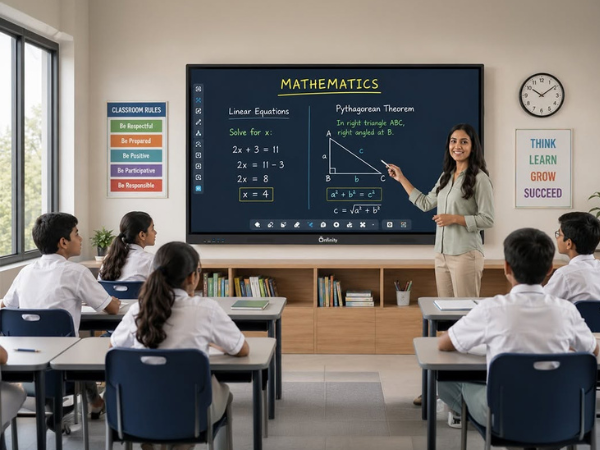
A smart board for classroom learning changes this dynamic by turning the front of the classroom into an interactive learning space. Teachers can display videos, diagrams, presentations, websites, digital notes, quizzes, and other learning resources while students can participate directly through touch and on-screen activities.
The real value, however, is not simply having a large touchscreen. It is using the technology in ways that encourage students to see, interact, discuss, solve, and participate.
How Does a Smart Board Make Teaching More Interactive?
A smart board for classroom learning makes lessons more interactive by allowing teachers to combine touch-based activities, multimedia, digital notes, diagrams, videos, quizzes, and collaborative exercises in one display. Instead of only watching a teacher write or present, students can interact with lesson content and participate more actively in classroom activities.
What Is a Smart Board for Classroom Learning?
A smart board is an interactive digital display designed to support teaching and collaboration. Modern solutions often use a large touchscreen with features such as annotation, screen sharing, multimedia playback, connectivity, and access to digital learning resources.
An interactive flat panel display takes this concept further by combining a large high-resolution screen with touch interaction and built-in or connected computing capabilities.
For example, a teacher explaining the solar system can:
- Display a visual model of the planets
- Zoom into specific details
- Annotate the diagram
- Play a short educational video
- Ask students questions
- Invite students to interact with the display
- Save the lesson notes for later review
This creates a lesson that is more dynamic than simply writing information on a traditional board.
7 Ways a Smart Board Makes Classroom Teaching More Interactive
1. Turns Students From Viewers Into Participants
One of the biggest advantages of a smart board for classroom use is that students can participate directly.
Instead of asking students to simply look at a presentation, teachers can invite them to:
- Solve problems on the screen
- Match answers
- Label diagrams
- Complete digital exercises
- Highlight important information
- Rearrange objects
- Write or draw explanations
For example, during a mathematics lesson, a teacher could display an equation and ask a student to solve it directly on the board. Other students can review the solution and discuss whether the answer is correct.
The technology becomes a tool for participation rather than just another screen.
2. Makes Complex Concepts Easier to Visualize
Some concepts are difficult to explain using words or static textbook images.
Science, geography, mathematics, and other subjects can benefit from visual demonstrations.
A teacher could use a digital board for classroom teaching to display:
- 3D models
- Maps
- Charts
- Scientific diagrams
- Mathematical graphs
- Historical timelines
- Interactive simulations
For instance, rather than describing how the human heart works, a teacher can display an animated diagram and walk students through the flow of blood step by step.
Visual explanations can give students another way to understand concepts that may otherwise feel abstract.
3. Brings Multimedia Into Everyday Lessons
A modern classroom does not have to rely on one type of learning material.
With an interactive display, teachers can combine text, images, audio, video, presentations, websites, and interactive activities within the same lesson.
This can be especially useful when introducing a new topic.
Imagine an English lesson about a historical event. The teacher could:
- Display the key dates.
- Show photographs from the period.
- Play a short video.
- Ask students questions.
- Highlight important vocabulary.
- Create a timeline with the class.
Microsoft’s education resources similarly emphasize interactive and inclusive digital learning experiences, including tools designed to support personalized practice and classroom engagement.
4. Encourages Collaborative Learning
A smart board does not have to be controlled by the teacher throughout the entire lesson.
Students can work together around the display to complete activities, solve problems, organize information, or present their ideas.
For example, a teacher might divide a class into small groups and ask each group to contribute to a digital mind map.
This encourages students to:
- Explain their thinking
- Listen to classmates
- Work toward a shared answer
- Present ideas
- Learn from different approaches
The interactive display becomes a shared workspace rather than simply a presentation screen.
5. Makes Quizzes and Assessments More Engaging
Assessment does not always need to happen through a worksheet or formal test.
Teachers can introduce quick questions during lessons to check whether students understand the topic.
For example:
Question: Which planet is known as the Red Planet?
Students could choose from several options displayed on the board before the teacher explains the answer.
Digital learning platforms increasingly support interactive questions, real-time feedback, and learning insights. Google Classroom, for example, provides interactive learning features such as practice sets and interactive questions for video content.
A smart board can provide the visual and interactive interface through which these activities become part of a lesson.
6. Helps Teachers Adapt Lessons in Real Time
Every class learns differently.
Sometimes a teacher realizes that students understand a topic quickly. At other times, the class needs another explanation or example.
An interactive flat panel for classroom teaching makes it easier to adjust the lesson on the spot.
A teacher can:
- Zoom into a diagram
- Add annotations
- Search for an additional example
- Display another explanation
- Revisit previous notes
- Show a video
- Ask an additional question
This flexibility can help teachers respond to what is actually happening in the classroom instead of following a rigid presentation from beginning to end.
7. Supports Different Learning Styles and Needs
Students do not all learn in exactly the same way.
Some respond well to visual explanations. Others benefit from discussion, demonstrations, written examples, or hands-on interaction.
A smart board allows teachers to combine several approaches.
For example, one lesson might include:
See → Explain → Interact → Discuss → Practice
This combination can create a more inclusive learning experience.
Microsoft also highlights accessibility and inclusive digital learning tools as part of its education ecosystem, while Google provides features supporting differentiated instruction and personalized learning.
Smart Board vs Traditional Board: What’s the Difference?
| Feature | Traditional Board | Smart Board / Interactive Display |
|---|---|---|
| Writing | Yes | Yes |
| Touch interaction | No | Yes |
| Videos | No | Yes |
| Digital presentations | No | Yes |
| Interactive activities | Limited | Yes |
| Digital annotation | No | Yes |
| Multimedia content | Limited | Yes |
| Saving lesson content | Usually no | Often possible |
| Internet-based resources | No | Yes, depending on setup |
| Student participation | Mainly verbal/written | Touch + verbal + digital |
The important distinction is not that a smart board automatically creates better teaching. The teacher and lesson design remain the most important factors.
The technology simply gives educators more ways to deliver and structure learning.
How Teachers Can Use a Smart Board Effectively
Buying an interactive display is only the first step. Teachers need a practical approach to get meaningful value from it.
Step 1: Start With the Learning Objective
Before choosing an interactive activity, decide what students should learn.
For example:
“Students will be able to identify the three stages of the water cycle.”
The technology should support that objective rather than become the objective itself.
Step 2: Choose the Right Interactive Activity
Ask:
- Can students solve something on the screen?
- Would a diagram explain this better?
- Could a short video demonstrate the concept?
- Can students work together?
- Can I use a quick quiz to check understanding?
Step 3: Give Students Opportunities to Interact
Don’t let the teacher become the only person touching the display.
Invite students to solve, annotate, organize, explain, and present.
Step 4: Use Technology Alongside Traditional Teaching
A smart board does not mean teachers should eliminate discussion, books, handwriting, experiments, or group work.
The strongest classroom approach combines technology with proven teaching practices.
Step 5: Review What Worked
After the lesson, consider:
- Did students participate more?
- Did the visual material clarify the topic?
- Which activity generated the most discussion?
- Where did students struggle?
- What could be improved next time?
This turns the smart board from a piece of hardware into a meaningful teaching tool.
Real Classroom Example: Teaching Fractions With an Interactive Display
Consider a mathematics lesson on fractions.
Instead of writing several examples on a traditional board, the teacher can display a digital circle divided into equal sections.
Students can then:
- Identify the numerator and denominator.
- Shade different sections.
- Compare fractions.
- Drag visual elements into the correct position.
- Explain their answers to the class.
- Complete a short quiz.
The teacher can then save the lesson notes and use them for revision.
This type of activity combines visual learning, interaction, explanation, and assessment in one lesson.
What Should Schools Look for in a Smart Board?
When selecting a smart board or interactive flat panel for classroom use, schools should look beyond screen size.
Important considerations include:
- Touch responsiveness
- Display resolution
- Screen size
- Brightness and viewing angles
- Built-in speakers
- Connectivity options
- Wireless screen sharing
- Operating system and software compatibility
- Annotation capabilities
- Device compatibility
- Ease of use for teachers
- Warranty and after-sales support
- Security and device management
The right choice depends on the school’s classrooms, teaching requirements, existing technology, budget, and IT infrastructure.
Why Interactive Displays Are Becoming Part of Modern Classrooms
Digital learning is no longer limited to computer labs. Teachers can now combine classroom instruction with interactive digital resources, collaborative activities, online platforms, and multimedia content. This shift is part of a wider move toward smart classroom technology, helping teachers create more connected and interactive learning environments.
Google for Education, for example, provides classroom tools that support interactive assignments, real-time feedback, differentiated instruction, and personalized learning activities.
Similarly, Microsoft’s education tools support digital learning, collaboration, accessibility, and interactive classroom experiences.
As a result, the role of classroom displays is changing. A screen at the front of the room is no longer simply something students look at. When properly integrated into teaching, it can become a shared workspace where teachers and students can explain ideas, practice concepts, discuss questions, and collaborate on activities.
Expert Insight: Technology Should Support Teaching, Not Replace It
One important point is often overlooked when schools invest in classroom technology.
An interactive display does not automatically make a lesson interactive.
A teacher can use the most advanced display available and still deliver a completely passive lecture.
The better approach is to design activities around participation.
For example:
Less interactive:
Teacher displays a PowerPoint → Students watch → Teacher moves to the next slide.
More interactive:
Teacher introduces a concept → Students interact with a visual → Students solve a problem → Class discusses different answers → Teacher provides feedback.
The display supports the second approach, but the teaching strategy creates the interaction.
Make Your Classroom More Interactive With Onfinity Technologies Pvt. Ltd.
A modern classroom should give teachers more ways to explain ideas and students more opportunities to participate.
A smart board for classroom learning can bring together digital content, touch interaction, multimedia, collaboration, and assessment in one teaching environment. But the biggest benefit comes when technology is combined with thoughtful lesson planning and active student participation.
If your school is planning to upgrade its classrooms with an interactive flat panel display or digital board for classroom teaching, explore Onfinity’s interactive display solutions and choose a setup designed around your teachers’ and students’ real needs.
The goal isn’t simply to put a smarter screen in the classroom. It’s to create a smarter way to teach and learn.
Frequently Asked Questions
A smart board is an interactive digital display that allows teachers and students to interact with digital content using touch, annotation, multimedia, and connected educational resources.
It can make lessons more interactive by allowing teachers to use videos, diagrams, digital activities, quizzes, annotations, and collaborative exercises while giving students opportunities to participate directly.
An interactive flat panel offers capabilities that a traditional whiteboard does not, including touch interaction, multimedia content, digital annotation, screen sharing, and access to digital resources. However, the best option depends on the school’s teaching requirements.
Yes. Teachers can invite students to write, solve problems, annotate diagrams, complete activities, present work, and interact with digital content directly on the display.
Yes. Depending on the setup and software, an interactive display can support video conferencing, online resources, screen sharing, and digital learning platforms.
Interactive displays can be used across subjects, including mathematics, science, English, social studies, geography, languages, computer education, and vocational training.
The terms are often used interchangeably. In practice, modern digital boards and interactive flat panels generally refer to large touchscreen displays that allow teachers and students to interact with digital content.