
Walk into a modern classroom and you may see much more than a traditional board and projector. Teachers increasingly use digital displays to present lessons, annotate diagrams, play educational videos, access online resources, and involve students in classroom activities.
This raises an important question for schools planning a technology upgrade: Should you choose an interactive flat panel display or a projector?
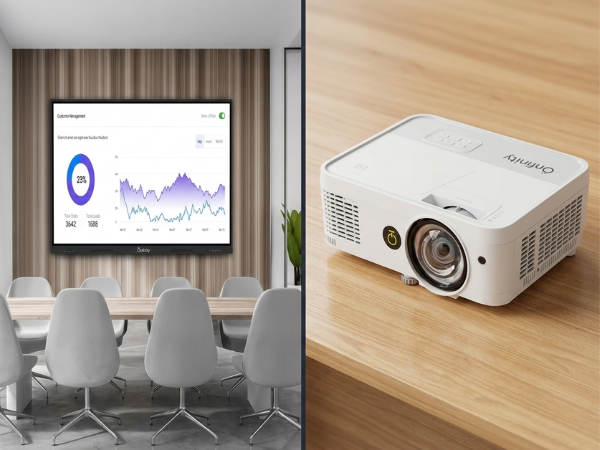
Both technologies can be effective classroom tools, but they work differently. A projector creates an image on a separate screen or wall, while an interactive flat panel display combines the screen, touch functionality, and digital interaction into one device.
The right choice depends on several factors, including classroom size, viewing distance, lighting, teaching style, interaction requirements, installation, budget, and long-term support.
In this guide, we’ll compare an interactive flat panel display vs projector and explain where each technology makes the most sense.
Interactive Flat Panel Display vs Projector
For many standard classrooms, an interactive flat panel display can be the more convenient option because it combines a direct-view display with touch interaction, annotation, and digital connectivity. However, projectors remain valuable where very large image sizes, existing infrastructure, or particular budget requirements are priorities.
What Is an Interactive Flat Panel Display?
An interactive flat panel display (IFPD) is a large touchscreen designed for teaching, presentations, collaboration, and digital content.
Unlike a conventional projector, an interactive flat panel does not need to project an image onto a separate screen. The display itself produces the image, while its touch capabilities allow teachers and students to interact directly with digital content.
Depending on the model, an interactive flat panel display may support:
- Digital whiteboarding
- Touch-based annotation
- Presentations
- Video playback
- Educational applications
- Web-based learning resources
- Wireless screen sharing
- Document and image display
- Collaborative classroom activities
Schools considering this technology can also review Onfinity’s Interactive Flat Panel Display buying guide for additional guidance on selecting a suitable display.
Example: Teaching Fractions
Imagine a mathematics teacher explaining fractions.
The teacher can display a digital worksheet, write directly over it, highlight important information, move objects around the screen, and ask a student to solve a problem directly on the display.
The important benefit is not simply having a touchscreen. It is the ability to combine digital content and classroom interaction on the same teaching surface.
What Is a Projector-Based Classroom?
A classroom projector creates an enlarged image by projecting light onto a wall or projection screen.
A typical setup may include:
- Projector
- Projection screen or suitable wall
- Laptop or computer
- HDMI, USB-C, or wireless connection
- Speakers
- Additional interactive equipment, if required
Projectors have been used in educational environments for many years and remain useful because they can produce very large images.
Modern projectors also vary considerably. Traditional lamp-based models have different maintenance requirements from newer laser projectors, which can offer long light-source life and reduced lamp-related maintenance.
Therefore, schools should compare the type of projector, rather than assuming every projector has the same performance or maintenance needs.
Interactive Flat Panel Display vs Projector: Key Differences
The best comparison is not simply about which technology is newer. Schools should consider how each solution performs against the requirements of their classrooms.
| Factor | Interactive Flat Panel Display | Projector |
|---|---|---|
| Direct touch interaction | Built into the display | Requires suitable interactive technology if needed |
| Annotation | Typically supported | Depends on projector/setup |
| Image size | Determined by panel size | Flexible and can become very large |
| Ambient light | Direct-view display can offer strong visibility | Performance depends on projector brightness, screen, and room lighting |
| Installation | Wall-mounted or mobile stand | Mounting and projection surface required |
| Shadow issue | No projected beam | Can occur with conventional front projection |
| Collaboration | Strong when touch/software features are available | Depends on setup |
| Maintenance | Hardware/software support required | Varies by lamp or laser technology |
| Large venues | Requires appropriately sized display | Particularly flexible for very large images |
| Classroom workflow | Integrated | Often requires separate source equipment |
There is no universal winner. The better option depends on the classroom and the way teachers intend to use the technology.
1. Display Visibility and Classroom Lighting
Lighting is an important consideration when selecting classroom display technology.
A projector’s image is affected by the interaction between its brightness, the projection surface, and ambient light. A bright classroom can reduce the apparent contrast of projected content, particularly when the projector and screen are not well matched to the environment.
At the same time, modern high-brightness and laser projectors can perform effectively in well-lit rooms. Schools therefore should not assume that all projectors have poor visibility in bright classrooms.
An interactive flat panel provides a direct-view image, which removes the need to project light across the room.
What Should Schools Do?
Before purchasing either solution, test the technology in the actual classroom.
Check:
- Natural daylight
- Ceiling lighting
- Text readability
- Viewing distance
- Screen reflections
- Content visibility from the back row
The best display is the one students can comfortably see from their actual seating positions.
2. Touch Interaction and Classroom Activities
Touch interaction is one of the biggest practical differences between a standard projector and an interactive flat panel.
A conventional projector primarily functions as a display. If a school wants students to interact with projected content, additional interactive hardware or an interactive projector may be required.
An interactive flat panel is designed for direct interaction.
Depending on the model, teachers may be able to:
- Write on digital content
- Highlight information
- Move objects
- Draw diagrams
- Zoom into images
- Annotate documents
- Invite students to work directly on the screen
Example: A Science Lesson
A teacher is explaining the water cycle.
Instead of simply displaying an illustration, the teacher can ask students to identify evaporation, condensation, and precipitation directly on the digital diagram.
One student can annotate the first stage, while another student adds the next.
This can make the display a more active part of the lesson.
However, it is important not to claim that the hardware alone improves learning. Evidence on interactive classroom technology is nuanced. A meta-analysis of interactive-whiteboard-based instruction found positive effects on cognitive learning outcomes, while also identifying pedagogy as an important factor influencing effectiveness.
In other words, good teaching comes first; technology should support it.
3. Teaching Workflow
Classroom technology should make teaching easier rather than becoming an interruption.
With a projector setup, the workflow may involve:
- Starting the projector
- Connecting a laptop
- Selecting the correct input
- Adjusting the projected image
- Managing separate speakers or other equipment
The exact process depends on the equipment and installation.
An interactive flat panel can bring several classroom functions together, including digital whiteboarding and display of connected content.
This can be particularly useful when a lesson moves rapidly between different activities.
Example
A teacher begins with a vocabulary exercise, moves to an educational video, pauses the video for discussion, opens a digital worksheet, and then asks students to annotate an example.
An integrated interactive display can support these transitions from one central teaching surface.
4. Student Participation and Collaboration
A classroom display can be used for much more than teacher presentations.
Students may use it to:
- Solve problems
- Present projects
- Annotate diagrams
- Organize ideas
- Participate in digital activities
- Demonstrate solutions
For example, a mathematics teacher could display a problem and invite two students to work through different solution methods on the screen.
The class can then compare both approaches.
An interactive flat panel can make this type of activity easier because students can interact directly with the content.
Schools looking to create a broader connected learning environment can also explore Onfinity’s smart classroom technology resources.
5. Installation and Classroom Layout
Installation requirements are different for each technology.
A projector installation may need to account for:
- Throw distance
- Mounting position
- Projection surface
- Cable routing
- Screen location
- Seating arrangement
- Potential shadows
An interactive flat panel also requires proper installation, but it does not depend on a projector beam reaching a separate screen.
Schools should consider:
- Classroom dimensions
- Viewing distance
- Wall strength
- Power availability
- Network connectivity
- Seating arrangement
- Accessibility
- Display height
A display that is technically impressive may still be unsuitable if students at the back cannot comfortably read the content.
6. Maintenance and Long-Term Support
Maintenance is often discussed as though all projectors require the same level of upkeep. That is no longer accurate.
Lamp-based projectors can require lamp replacement and filter-related maintenance, while modern laser projectors can significantly reduce lamp-related maintenance. For example, current Epson interactive laser projector models advertise long-life laser light sources without conventional lamp replacement.
Interactive flat panels do not use projector lamps, but they still require:
- Screen cleaning
- Software updates
- Firmware updates
- Connectivity management
- Technical support
- Hardware servicing when required
Therefore, schools should compare the expected maintenance requirements of the specific models being considered, rather than judging the technology category alone.
Think About Total Cost of Ownership
The purchase price is only one part of the investment.
A projector solution may involve:
- Projector
- Projection screen
- Mount
- Installation
- Cabling
- Speakers
- Source device
- Interactive accessories, if needed
An interactive flat panel can integrate several functions into one device, but its initial purchase price may be higher than that of a basic projector.
Schools should compare the complete solution over its expected service period.
7. Screen Size and Large Learning Spaces
This is where projectors can have a clear advantage.
A projector can create an image substantially larger than a typical classroom panel, depending on the projector, lens, screen, and room.
Modern interactive laser projectors can also support large interactive projection areas. For example, Epson currently lists interactive laser models supporting image sizes up to 100 inches and beyond, depending on the model and configuration.
This makes projection worth considering for:
- Lecture halls
- Auditoriums
- Large training rooms
- Assembly areas
- Large-format presentations
For a standard classroom, however, an appropriately sized interactive flat panel may provide a better balance between visibility and direct interaction.
The Important Question
Instead of asking:
“Which display is bigger?”
Ask:
“What screen size is appropriate for the room and viewing distance?”
That produces a much more useful purchasing decision.
8. Cost and Total Value
Schools often compare the initial price of a projector with the price of an interactive flat panel.
That comparison can be misleading because the complete classroom setup may include several additional components.
Consider:
- Hardware
- Installation
- Mounting
- Projection screen
- Accessories
- Software
- Maintenance
- Technical support
- Teacher training
- Replacement requirements
A basic projector may have a lower initial price, while a feature-rich interactive display may provide more functionality in one device.
But a higher price does not automatically mean better value.
The correct question is:
Which solution provides the functions the school actually needs?
Which Technology Is Better for Different Classrooms?
Choose an Interactive Flat Panel When:
An interactive flat panel may be a strong fit when the school prioritizes:
- Direct touch interaction
- Digital annotation
- Student participation
- Multimedia teaching
- Integrated classroom technology
- Digital whiteboarding
- Collaborative activities
Example
A primary classroom uses digital storybooks, educational videos, handwriting activities, diagrams, and interactive exercises throughout the school day.
An interactive display can bring these activities onto one teaching surface.
Consider a Projector When:
A projector may be a better fit when:
- A very large image is required
- The room is a lecture hall or auditorium
- Existing projection infrastructure is already available
- Teachers primarily need presentation capabilities
- Touch interaction is not essential
- The school has a suitable projection environment
Example
A college lecture hall needs to display engineering drawings to a large audience.
In this situation, image size may be more important than direct touch interaction.
What About a Smart Board for Classroom Teaching?
The phrase smart board for classroom is widely used when discussing interactive teaching displays, although products differ considerably in their technology and capabilities.
Schools should therefore avoid selecting a product based solely on its name.
Before purchasing, ask:
- What type of touch technology does it use?
- What screen sizes are available?
- What resolution does it offer?
- Does it support wireless screen sharing?
- What software platform does it use?
- Can teachers annotate content?
- Can computers and other devices be connected?
- Does it support the school’s existing applications?
- What warranty and technical support are provided?
Interactive displays are not identical. Features such as touch technology, connectivity, software, and device management can vary significantly between models.
How to Choose the Right Classroom Display
Schools can follow this simple process.
Step 1: Assess the Room
Measure classroom dimensions and determine the viewing distance.
Step 2: Check Lighting
Evaluate the classroom during different times of the day.
Step 3: Understand Teacher Requirements
Ask teachers how they currently use displays and what limitations they experience.
Step 4: Define Interaction Needs
Determine whether teachers and students need touch, annotation, digital whiteboarding, or collaborative activities.
Step 5: Compare Complete Solutions
Compare the complete installation—not just the display price.
Step 6: Test Before Buying
If possible, allow teachers to test the equipment with real classroom content.
This can reveal usability issues that specifications alone may not show.
Final Verdict: Interactive Flat Panel or Projector?
There is no universal winner.
For a standard classroom where direct interaction, annotation, digital whiteboarding, and student participation are important, an interactive flat panel can be a highly practical choice.
For large spaces where image size is the priority, or where a school already has suitable projection infrastructure, a projector may be more appropriate.
The best decision is therefore not about choosing the newest technology. It is about matching the technology to the room, teaching style, student needs, budget, and long-term support strategy.
Schools planning an interactive flat panel for classroom environments should assess their actual teaching requirements before selecting a particular display.
Build a More Connected Classroom With Onfinity Technologies
Choosing classroom technology becomes easier when the solution is matched to the actual learning environment.
Onfinity Technologies Pvt. Ltd. provides digital display and interactive technology solutions for modern educational and professional environments. Schools can evaluate classroom size, display requirements, connectivity, collaboration needs, and future technology plans before selecting an appropriate solution.
Ready to explore classroom display options? Connect with Onfinity Technologies to find a solution aligned with your school’s teaching and technology requirements.
Frequently Asked Questions
For many standard classrooms, an interactive flat panel can provide a more integrated teaching experience because display and touch interaction are combined. However, projectors can remain the better option for very large images, lecture spaces, or classrooms with suitable existing projection infrastructure.
In many classrooms, yes. An appropriately sized interactive panel can support presentations, videos, digital whiteboarding, annotation, and interactive activities without requiring a separate projector and projection screen.
A basic projector can have a lower initial purchase price, but schools should compare the complete solution. Installation, screens, mounts, accessories, maintenance, and support can affect total cost.
An interactive flat panel may offer a more consistent direct-view experience because it does not depend on projected light travelling to a separate screen. However, modern high-brightness and laser projectors can also perform well in bright environments. The specific projector, screen, and room conditions should be evaluated.
Yes. Projectors remain useful for large-format presentations, lecture halls, auditoriums, and classrooms where projection infrastructure is already established.
No. The technology itself does not guarantee better learning. Research suggests that the pedagogical approach and the way interactive technology is integrated into instruction influence its effectiveness.
Important factors include screen size, viewing distance, resolution, touch technology, connectivity, software compatibility, installation, warranty, technical support, and total cost of ownership.