


Choosing an LED display involves more than deciding how large the screen should be. The distance between viewers and the display also affects how clearly they can see text, images, videos, and other content. This is where LED display pixel pitch becomes important.
You may come across specifications such as P1.5, P2, P2.5, P3, or P4 when comparing LED video walls. These numbers describe the spacing between pixels and help buyers understand the level of image detail a display can provide at different viewing distances.
However, a smaller pixel pitch is not automatically the best choice for every project. A display installed in a corporate meeting room has different requirements from one used for a shopping mall, auditorium, or outdoor advertising installation.
In this guide, we explain what pixel pitch means, how it affects image quality, and what businesses should consider before selecting an LED display.
What Is Pixel Pitch in an LED Display?
Pixel pitch is the distance between the centres of two neighbouring pixels on an LED display. It is usually measured in millimetres.
For example:
- P1.5: A pixel pitch of approximately 1.5 mm.
- P2: A pixel pitch of approximately 2 mm.
- P2.5: A pixel pitch of approximately 2.5 mm.
- P4: A pixel pitch of approximately 4 mm.
The number after the letter P represents the distance between adjacent pixel centres.
In general, a smaller pixel pitch means pixels are positioned closer together. This allows a display of a given physical size to contain more pixels, which can improve image detail when viewed from a suitable distance.
A larger pixel pitch means pixels are spaced farther apart. Depending on the screen size and viewing distance, this may be perfectly suitable for displays viewed from farther away.
Why Does Pixel Pitch Matter?
Pixel pitch influences how detailed an LED display appears, particularly when people view it from nearby.
Imagine two LED displays installed in different environments.
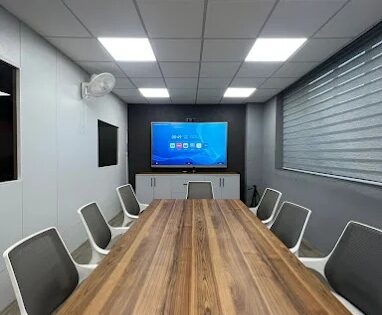
The first is inside a meeting room where people sit relatively close to the screen. Small text, charts, presentations, and detailed graphics may need to remain clear at that distance.
The second is installed on a building facade where viewers see the screen from across a road. People generally view the content from much farther away.
These installations do not necessarily need the same pixel pitch.
When choosing an LED display, pixel pitch should be considered alongside screen dimensions, viewing distance, content type, brightness, installation environment, and budget.
What Is the Difference Between P1.5, P2, P2.5, P3 and P4?
The main difference is the distance between adjacent pixels. The smaller the number, the closer the pixels are together.
| Pixel pitch | General characteristic | Potential application |
|---|---|---|
| P1.5 | Closely spaced pixels for detailed viewing | Meeting rooms and premium indoor displays |
| P2 | Fine pixel spacing | Corporate displays and indoor video walls |
| P2.5 | A balance between pixel density and display cost | Retail spaces and commercial interiors |
| P3 | Wider pixel spacing than fine-pitch options | Selected indoor commercial installations |
| P4 | Wider pixel spacing | Displays where viewing distance supports it |
These are illustrative examples, not fixed application rules. A P2 display is not automatically suitable for every meeting room, and P4 is not automatically suitable for every outdoor installation.
The correct specification depends on the actual project requirements and the available display models.
How Does Viewing Distance Affect Pixel Pitch?
Viewing distance is one of the most important factors when selecting an LED display.
When people stand close to a screen, they may notice the spacing between pixels more easily. From farther away, the individual pixels become less noticeable, depending on the display and viewing conditions.
Consider these examples:
Corporate meeting room: Participants may sit close to the display and need to read detailed presentations, spreadsheets, or text. A fine-pitch display may be worth considering.
Retail showroom: Customers may view promotional videos from different positions. The suitable pixel pitch depends on how close people stand and the type of content being displayed.
Auditorium: People sitting near the front may have different viewing requirements from those sitting at the back. The display should be assessed for the expected audience positions.
Outdoor advertising: Viewers may see the display from a considerable distance. Pixel pitch should be evaluated alongside screen size, brightness, viewing conditions, and the type of content shown.
Rather than selecting a pixel pitch using a universal viewing-distance formula, assess the actual installation and review the manufacturer’s recommendations.
Does a Smaller Pixel Pitch Always Mean Better Quality?
Not necessarily.
A smaller pixel pitch can provide greater pixel density within the same screen area, but that does not mean it is the most practical choice for every installation.
Consider the following factors.
1. Viewing Distance
If the audience views the display from farther away, the additional detail provided by a very fine-pitch screen may offer limited practical value.
2. Content Type
A display showing detailed text, data, diagrams, or presentations may benefit from finer pixel spacing.
A screen primarily showing large graphics, promotional videos, or simple messages may have different requirements.
3. Screen Dimensions
Pixel pitch affects how many pixels fit across the display. Screen dimensions and pixel pitch should therefore be considered together when evaluating the required image resolution.
4. Project Budget
Fine-pitch displays can involve a higher purchase cost, depending on the technology, model, and configuration. Buyers should compare complete project quotations rather than assuming that the smallest pitch offers the best value.
The goal is to select the right combination of image detail, viewing distance, screen size, and cost.
How to Choose Pixel Pitch for Different Environments
LED Displays for Meeting Rooms
In meeting rooms and boardrooms, people may view presentations, graphs, dashboards, and other detailed information from relatively close distances.
Consider the distance between the display and the nearest regular viewer. Also check whether the screen will primarily show presentations, video content, or detailed data.
Fine-pitch options may be worth evaluating when close viewing and detailed content are important.
LED Displays for Retail and Shopping Malls
Retail displays may be used for brand campaigns, product promotions, seasonal advertising, and video content.
A display inside a shop may be viewed at close range, while a large screen in a mall atrium may be viewed from farther away.
The viewing environment should guide the decision. Screen size, placement, brightness, and content also influence how effectively the display communicates its message.
LED Displays for Auditoriums and Large Venues
Large venues can have a wide range of audience viewing distances.
People seated near the display may notice pixel spacing more than those sitting farther away. Consider the seating layout, the display’s dimensions, and whether the content includes detailed text or mainly visual material.
The appropriate pixel pitch should be selected after assessing the expected audience positions.
Outdoor LED Displays
Outdoor installations need to account for viewing distance, daylight, environmental exposure, and screen size.
Pixel pitch is only one part of the decision. Brightness requirements, enclosure protection, installation structure, and maintenance access can also affect the final configuration.
For more detail about these environmental requirements, see our guide to indoor LED vs outdoor LED displays.
Pixel Pitch and LED Display Resolution: What Is the Difference?
Pixel pitch and resolution are related, but they are not the same thing.
Pixel pitch describes the physical spacing between adjacent pixels.
Resolution describes the number of pixels that make up the image, usually expressed as width by height.
For example, a display’s resolution might be expressed as 1920 × 1080 pixels. That figure tells you how many pixels form the image, while pixel pitch tells you how closely those pixels are spaced physically.
For LED displays, the overall pixel resolution depends on the display’s physical dimensions and pixel pitch.
Two displays with different physical dimensions can have different resolutions even if their pixel pitch is identical.
This is why buyers should check both the pixel pitch and the resulting display resolution when evaluating a proposed configuration.
What Should You Check Before Buying an LED Display?
Before finalising an LED display, consider these questions:
- Where will the display be installed?
- What is the typical viewing distance?
- How close will the nearest viewer stand or sit?
- Will the screen display detailed text, presentations, videos, or advertising?
- What physical screen dimensions are required?
- What resolution does the application need?
- Will the display operate indoors or outdoors?
- What brightness is appropriate for the environment?
- What installation and maintenance requirements apply?
- Does the proposed configuration fit the available budget?
Ask the supplier to explain why the recommended pixel pitch suits your specific installation. Request the relevant product specifications and a quotation that identifies the display configuration, installation requirements, control system, and other project components.
This makes it easier to compare options on practical value rather than relying on a single specification.
LED Display Solutions from Onfinity Technologies Pvt. Ltd.
Onfinity Technologies Pvt. Ltd. offers LED video wall solutions for indoor and outdoor environments. Its published product information lists applications such as command centres, retail signage, shopping malls, sports arenas, and building facades.
Explore the LED Video Wall solutions to review the available product range and discuss the requirements of your installation.
The most suitable configuration will depend on the intended use, viewing distance, screen dimensions, image-detail requirements, and installation conditions. Confirm the exact pixel pitch and other specifications for the model being considered before making a purchase.
Final Thoughts
Choosing the right LED display pixel pitch starts with understanding how people will view the screen.
A smaller pixel pitch can be useful when close viewing and fine image detail matter. A larger pixel pitch may be appropriate when the audience is farther away and the content does not require the same level of detail at close range.
Neither option is universally better. The right choice depends on the viewing environment, screen size, content, resolution requirements, and project budget.
Before selecting an LED video wall, compare pixel pitch alongside the other specifications that affect its performance. This helps you choose a display that meets your actual requirements without paying for features that may not provide meaningful value.
Frequently Asked Questions
Pixel pitch is the distance between the centres of adjacent pixels, measured in millimetres. It helps indicate how closely the pixels are spaced on an LED display.
P2 has a smaller pixel pitch than P4 and allows more closely spaced pixels. It may be better for some close-viewing applications, but P4 can be suitable in other environments. The right option depends on viewing distance, content, screen size, and budget.
There is no single pixel pitch suitable for every indoor video wall. Consider how close viewers will be, the content being shown, the screen dimensions, and the required image detail before selecting a specification.
A smaller pixel pitch generally supports closer viewing before individual pixels become noticeable. The actual viewing experience also depends on the display, content, screen dimensions, and viewer expectations.
No. Pixel pitch measures the physical spacing between pixels, while resolution describes the total number of pixels in the image. Both specifications should be considered when selecting a display.
Not always. Outdoor displays are often viewed from farther away, but the appropriate pixel pitch depends on viewing distance, screen size, content, and the installation’s requirements. Outdoor suitability also depends on brightness and environmental protection.



2 Comments