
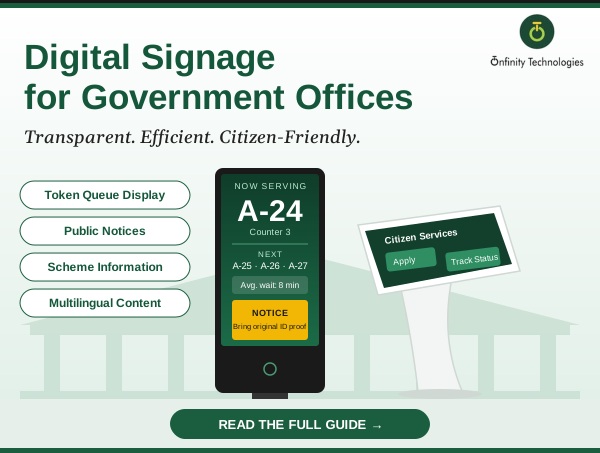
Government offices and public service centres receive visitors throughout the day who need information about services, departments, procedures, announcements and important updates. Finding the right information quickly can sometimes be challenging, especially in busy facilities with multiple departments and service counters.
Digital signage provides a convenient way to share this information through digital displays placed in reception areas, waiting rooms, corridors and other public spaces. Instead of relying only on printed notices, offices can use digital screens to communicate updates and important information in a more organised manner.
Digital signage for government offices can support public communication by displaying announcements, service information, visitor guidance and general notices in a centralised format.
Why Government Offices Need Better Public Communication
Visitors may come to government offices for different reasons, including document applications, registrations, payments, enquiries and other public services. They may not always know which department to visit or what process to follow.
Clear communication can help visitors understand the available services and find relevant information more easily.
Digital displays can help government facilities:
- Share important public announcements.
- Display department information and service updates.
- Provide directions to counters and offices.
- Communicate notices to visitors.
- Reduce dependence on printed notices for frequently changing information.
The usefulness of digital signage depends on the information being displayed, how regularly it is updated and where the screens are installed.
1. Displaying Government Announcements and Public Notices
Government departments regularly need to communicate notices, public announcements, service-related updates and other important information.
Digital signage can provide a dedicated display space for these messages in reception areas, waiting rooms and other locations where visitors are likely to notice them.
For example, displays may communicate:
- Public notices and announcements
- Changes in office timings
- Holiday information
- Important deadlines
- Service availability updates
- General instructions for visitors
Using digital displays allows authorised staff to update information without replacing printed notices every time a change is required.
2. Helping Visitors Find Departments and Service Counters
Large government buildings may have several departments, offices and counters within the same facility. Visitors who are unfamiliar with the building may need assistance finding the correct location.
Digital signage can display department names, floor information, counter numbers and directional guidance.
When placed at entrances, reception areas and important junctions, these displays can help visitors understand where they need to go.
The content should be simple, readable and organised in a way that visitors can understand quickly.
3. Sharing Service Information and Application Procedures
Visitors often need information about the documents required, application procedures, eligibility conditions or steps involved in accessing a particular service.
Digital displays can present general service information in a structured format, helping visitors understand the process before approaching a counter.
For example, a government office may display:
- Documents required for a particular application
- General application steps
- Service counter information
- Important instructions
- Contact or enquiry information
- Information about available online services
This information should be reviewed regularly to ensure that visitors are not receiving outdated instructions.
4. Improving Communication in Waiting Areas
Waiting areas are useful locations for digital signage because visitors may spend time there before their turn.
Instead of displaying only static notices, offices can use screens to share a combination of public announcements, service information, general instructions and other relevant updates.
The content should remain useful and easy to read. Too much information on a single screen can make it difficult for visitors to understand the message.
A well-planned display layout can help present important information in a more organised manner.
5. Supporting Communication Across Multiple Departments
Government facilities may have separate departments handling different public services. Digital signage can help communicate information related to these departments from a central display or content management setup, depending on the system configuration.
For example, screens placed in different areas may display department-specific notices, service updates or visitor instructions.
A centralised content management system can make it easier for authorised staff to update content across multiple displays, subject to the software and network setup.
This can be useful when information needs to be updated across different areas of a building or multiple locations.
6. Digital Signage for Municipal Offices and Public Service Centres
Digital signage can be useful in different types of public facilities, including municipal offices, administrative buildings, citizen service centres and government service facilities.
Different locations may have different communication requirements.
| Location | Possible digital signage use |
|---|---|
| Reception areas | Welcome messages, visitor instructions and department information |
| Waiting rooms | Public notices, service updates and general announcements |
| Corridors | Directional information and floor guidance |
| Service counters | Process instructions and counter-specific information |
| Municipal offices | Civic notices, public announcements and service information |
| Public service centres | Application guidance and information about available services |
The display size, placement and content should be selected according to the location and the information visitors need.
7. Choosing the Right Digital Signage Solution for Government Facilities
Selecting digital signage for a government facility requires careful planning. The purpose of the display should be clear before deciding on the hardware and software.
Display Size and Placement
The screen should be visible from the expected viewing distance. Displays in large waiting areas may require different screen sizes compared with those installed near reception desks or service counters.
Placement should also consider visitor movement, lighting conditions and available wall space.
Readable Content
Public information should be easy to understand. Large text, short messages, clear headings and suitable contrast can help visitors read content without spending too much time in front of the screen.
Avoid overcrowding displays with lengthy notices or too many messages at once.
Content Management
Government offices may need to update announcements, notices and service information regularly.
A suitable digital signage system should allow authorised staff to manage and update content according to their requirements. The available scheduling, remote management and multi-screen features depend on the selected software and configuration.
Connectivity and Installation
Installation planning should consider power availability, network connectivity, cable management, mounting arrangements and maintenance access.
For facilities with multiple screens, organisations should also consider how the displays will be managed and how content updates will be handled.
Security and Access Control
Government facilities should consider who is authorised to manage display content and how access to the content management system is controlled.
Access permissions and security requirements should be evaluated according to the organisation’s IT policies and the software being deployed.
Digital Signage Solutions for Government Communication
Digital signage offers government offices a flexible way to communicate public information, service updates, notices and visitor guidance.
With the right display placement and content planning, digital screens can help make information easier to access throughout a facility. They can also provide a convenient way for authorised staff to update notices when information changes.
Onfinity Technologies Pvt. Ltd. provides digital display and signage solutions for different business and institutional applications. Organisations planning digital displays for public communication can explore the available digital signage solutions and evaluate configurations based on their facility, content and operational requirements.
Conclusion
Government offices and public service centres need to communicate information clearly to visitors. From public announcements and department directions to service procedures and waiting-area notices, digital signage can help organise information and make it easier to access.
The success of a digital signage setup depends on choosing suitable displays, placing them where visitors can see them, maintaining accurate content and selecting a management system that meets the facility’s requirements.
For government facilities looking to improve the way they share information, digital signage can be a practical addition to their public communication infrastructure.
Frequently Asked Questions
Digital signage for government offices refers to digital displays used to share public announcements, department information, service updates, visitor instructions and other notices within government buildings.
Digital displays can provide department directions, counter information, service procedures and public announcements, helping visitors access relevant information more easily.
Digital signage may be installed in reception areas, waiting rooms, corridors, service counters, entrance areas and other locations where visitors need information.
Remote content updates may be possible when the selected digital signage software supports remote management and the displays have the required network connectivity and configuration.
Government offices may display public notices, office timings, service information, document requirements, department directions, deadlines, announcements and general visitor instructions.
Yes. Digital signage can be used in municipal offices and public service centres to communicate civic information, service instructions, visitor guidance and public announcements. The display setup should be planned according to the facility’s requirements.