
Exhibitions and business events bring together companies, industry professionals and visitors in one place. For businesses participating in these events, communicating the right information clearly is important. Visitors may want to learn about products, explore services, find specific areas or understand what a company offers.
Traditional printed banners and information boards can serve basic purposes, but they may not always be suitable when businesses need to present videos, update information or provide interactive access to content. This is where digital displays for exhibitions can make a difference.
From LED video walls to digital signage kiosks, different display technologies can help businesses present information, improve visitor navigation and create more organised communication across exhibition spaces.
1. Present Brand and Product Information Through Digital Displays
At an exhibition, businesses often have limited time to introduce their products and services to visitors. Digital screens provide another way to communicate this information through visual content.
Businesses can use displays to present:
- Brand introductions and company profiles
- Product images and promotional videos
- Service information and key highlights
- Product demonstrations and presentations
- Event announcements and important updates
Visual content can make information easier to explore, especially when visitors are moving between different exhibition stalls. Businesses should keep messages concise and use clear visuals so that important information can be understood quickly.
2. Use Digital Kiosks to Help Visitors Find Information
Large exhibitions and business events may include multiple halls, stalls, product sections and information areas. Visitors may need assistance finding a particular exhibitor, understanding event schedules or locating specific facilities.
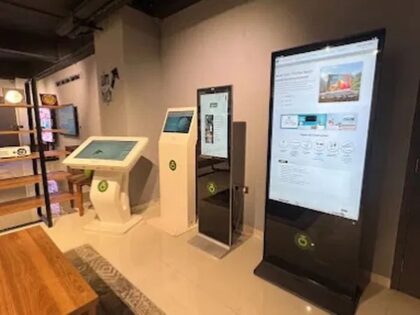
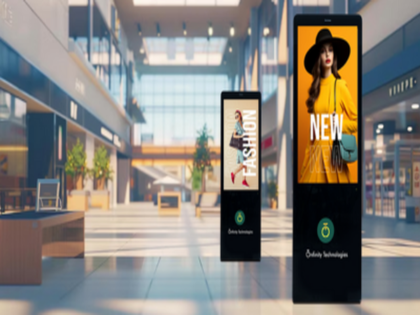
Digital signage kiosks can support visitor communication by providing a dedicated screen for information and wayfinding.
Depending on the configuration and software, a kiosk may be used for:
- Displaying event information
- Presenting exhibitor or company details
- Sharing promotional content
- Helping visitors access wayfinding information
- Providing access to selected interactive content on touch-enabled models
The exact functions depend on the kiosk hardware and software setup. Businesses should identify their requirements before selecting a suitable configuration.
3. Use LED Video Walls for Large-Format Visual Presentations
When a business wants to present videos, product visuals or brand content across a larger screen area, an LED video wall may be worth considering.
LED video walls provide large-format display surfaces for visual communication. At suitable exhibition venues, they can be planned as part of a booth’s presentation setup, subject to the display configuration and installation requirements.
Businesses can consider using LED displays for:
- Product and brand presentations
- Promotional videos
- Corporate introductions
- Visual demonstrations
- Event-related announcements
Screen size, viewing distance, indoor lighting and available space should be considered before selecting an LED display. The display should also complement the overall presentation area without obstructing visitor movement.
4. Make Exhibition Information Easier to Access
Visitors often look for specific information rather than wanting to watch a complete presentation. Digital displays can help businesses organise information into clear sections and make relevant content easier to find.
For example, an exhibition booth may use one screen for company information, another for product visuals and a kiosk for visitor guidance.
This approach can help separate different types of communication and reduce the need to display too much information on a single screen.
The arrangement should depend on the booth size, visitor requirements and purpose of each display.
5. Keep Exhibition Content Relevant and Updated
An exhibition may include product launches, scheduled presentations, special announcements and changing event information. Businesses need to ensure that the content displayed remains relevant throughout the event.
Network-connected digital signage kiosks can support remote content updates, as mentioned on Onfinity Technologies Pvt. Ltd.’s product page. This can be useful when information needs to be changed without manually accessing each display.
Before the event, businesses should prepare their content and check:
- Whether the visuals are suitable for the screen layout
- Whether text is readable from the intended viewing distance
- Whether videos and presentations play correctly
- Whether updated information is available when required
- Whether the display has the necessary connectivity
Content planning and testing can help avoid interruptions during the exhibition.
6. Select Displays According to the Exhibition Environment
Not every exhibition requires the same type of display. A small business booth may need a compact kiosk, while a larger presentation area may benefit from a large-format LED screen.
Some important factors to evaluate include:
Available space: Check the dimensions and layout of the area where the display will be installed.
Display purpose: Decide whether the screen will be used for promotional content, visitor information, product presentations or wayfinding.
Viewing conditions: Consider lighting, viewing distance and the expected position of visitors.
Display configuration: Check screen size, portrait or landscape orientation, touch requirements and connectivity options.
Installation requirements: Confirm power availability, mounting arrangements and venue guidelines before installation.
Selecting a display based on its intended use can help businesses avoid unnecessary equipment and create a more practical setup.
Digital Display Solutions from Onfinity Technologies Pvt. Ltd.
Onfinity Technologies Pvt. Ltd. provides digital display and kiosk solutions for business and public environments.
Its digital signage kiosk range includes touch and non-touch options, Android or Windows OS choices, portrait and landscape layouts, and network connectivity for remote updates. The published applications include event displays, public information and wayfinding.
The company also offers LED video wall solutions for indoor and outdoor environments, with custom sizes and configurations available. The product page lists applications such as command centres, retail signage, shopping malls, sports arenas and building facades.
Businesses can explore the available digital signage kiosk solutions and LED video wall solutions to understand the options relevant to their display requirements.
For a broader understanding of how businesses use digital displays to communicate information, explore these digital signage solutions for business applications.
Conclusion
Digital displays can support several communication requirements at exhibitions and business events. While LED video walls can be considered for large-format visual presentations, digital signage kiosks can help visitors access event information, promotional content and wayfinding details.
The most suitable solution depends on the exhibition environment, available space, content requirements and intended use. By selecting the right display technology and preparing relevant content in advance, businesses can make information easier to access and improve the overall visitor communication experience.
Frequently Asked Questions
Digital displays are used to present company information, promotional videos, product visuals, event announcements and visitor guidance. The type of display depends on the communication requirements of the exhibition.
Digital kiosks can provide access to event information, exhibitor details, promotional content and wayfinding information. Touch-enabled models may support interactive content depending on their configuration and software.
LED video walls may be suitable for exhibition spaces where large-format visual presentations are required. Their suitability depends on the venue, screen configuration, viewing distance and installation conditions.
Some network-connected digital signage kiosks support remote content updates. The available functionality depends on the hardware, software and connectivity configuration.
Businesses should consider booth dimensions, display purpose, screen size, viewing distance, lighting conditions, connectivity, installation requirements and the type of content they want to present.