
A good shopping experience is not only about the products a store offers. Customers also want to find information easily, locate stores without confusion and get assistance without unnecessary delays.
In busy retail stores and shopping malls, these everyday interactions can become challenging. Staff may be attending to other customers, visitors may struggle to find a particular store, and printed directories may not always provide the information people need.
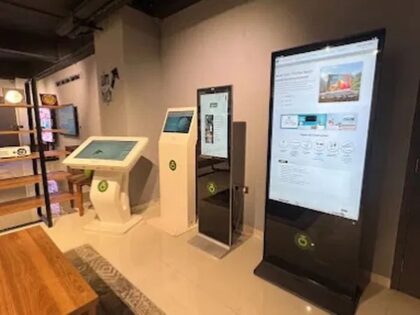
A self service kiosk offers another way to make these interactions more convenient. Through a digital screen, customers can access information, explore available options and use selected self-service functions, depending on the software installed.
For retailers and shopping mall operators, kiosks can support customer communication while helping visitors find information more independently.
What Is a Self-Service Kiosk?
A self-service kiosk is a digital terminal that allows people to interact with a business through an on-screen interface. Depending on its configuration, it may use a touchscreen or display information without touch functionality.
In retail and shopping mall environments, kiosks can be used for applications such as:
- Displaying store directories and location information.
- Helping visitors find departments, facilities and services.
- Presenting product and service information.
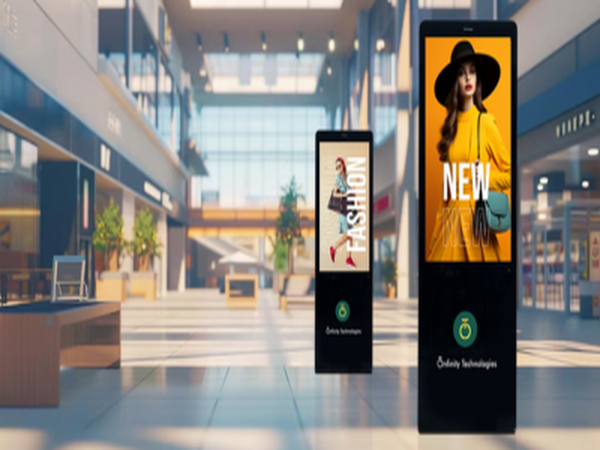
- Sharing promotional messages and announcements.
- Providing access to selected digital services through suitable software.
The actual functions depend on the kiosk hardware, software and integrations. A display terminal does not automatically include every self-service application.
1. Help Customers Find Products and Information
Customers sometimes need additional information before deciding what to buy. In a large retail store, finding the right department or product section may take time, particularly when staff are occupied.
An interactive kiosk can provide another way to access product categories, descriptions and other information made available by the retailer.
For example, an electronics store could use a kiosk to help visitors explore product categories and view information about selected items.
This gives customers an additional information channel and can make browsing more convenient.
2. Make Shopping Mall Navigation Easier
Large shopping malls often contain multiple floors, retail outlets, restaurants, entertainment areas and visitor facilities. First-time visitors may find it difficult to locate a particular destination.
A digital kiosk can act as an interactive directory, helping visitors search for stores and access relevant location information.
Depending on the software, it may provide:
- Store names and categories.
- Floor and location details.
- Directions to selected facilities.
- Information about restaurants and services.
- General visitor information.
Clear navigation can make a mall easier to explore and reduce the need for visitors to ask staff for every routine direction.
3. Provide Quick Access to Important Information
Retail businesses regularly communicate product details, store information, offers and announcements. Printed notices can be useful, but they may need replacement whenever the information changes.
A network-connected kiosk can provide a digital way to present relevant information. Onfinity’s published kiosk range includes network-connected configurations that support remote updates.
Retailers can use digital screens to share information such as:
- Current promotions and special offers.
- Product details and new arrivals.
- Store announcements.
- Important visitor instructions.
- Brand and campaign information.
Businesses should confirm the available content-management functionality before choosing a configuration.
4. Support Selected Self-Service Activities
Some customer requests involve straightforward activities that may be suitable for a self-service interface.
For example, a retailer may want customers to browse a digital catalogue, access service information or submit a request through a dedicated application.
A kiosk can support these activities when the required software is developed, installed and connected to the relevant business systems.
More advanced functions, such as order placement or payment processing, should be evaluated separately. They require suitable applications, integrations and security arrangements; they should not be assumed to come with every kiosk.
The objective is to make appropriate tasks easier while keeping staff available for customers who need personal assistance.
5. Give Customers More Control Over Their Experience
Not every customer prefers to ask an employee for basic information. Some people would rather explore available options independently before speaking to someone.
An interactive kiosk provides an additional way for visitors to access information at their own pace.
For example, a customer visiting a shopping mall could use a directory kiosk to find a store, while a shopper in a retail outlet could explore available product information through an interactive screen.
A simple interface is essential. Clear instructions, readable text and easy navigation help make the experience more useful.
6. Help Retail Staff Manage Routine Enquiries
Retail employees handle several responsibilities throughout the day, including customer assistance, product enquiries, store operations and coordination.
When a kiosk makes routine information available, customers may be able to resolve certain basic queries independently.
For example, visitors could use a digital directory to find a store rather than asking reception staff for directions each time.
This does not replace the value of personal assistance. Instead, it gives customers another option and may allow employees to spend more time on enquiries that require individual attention.
The impact depends on the type of kiosk, the information available and how well the system fits the store’s daily operations.
7. What Should Businesses Consider Before Choosing a Self-Service Kiosk?
Selecting a kiosk involves more than choosing a screen size. Businesses should first understand where it will be installed and what customers are expected to do with it.
Here are some important factors to review.
Purpose and application: Decide whether the kiosk will provide store directions, product information, promotional content or access to a specific self-service application.
Screen size and orientation: Consider the available installation space, viewing distance and whether a portrait or landscape layout is more suitable.
Touch or non-touch configuration: A touchscreen may be appropriate when visitors need to interact with the interface. A non-touch display may suit information and promotional applications.
Operating system: Check the available Android or Windows configuration and confirm that it is compatible with the intended application.
Connectivity: Review network requirements and confirm whether the selected setup supports the required content-update process.
Software and integration: Identify which applications are included and whether custom development or connections with existing business systems are required.
Installation and maintenance: Consider accessibility, power supply, placement, servicing requirements and ongoing technical support.
These checks help businesses select a kiosk that matches their actual requirements instead of paying for functions they may not need.
Self-Service Kiosk Solutions from Onfinity Technologies Pvt. Ltd.
Onfinity Technologies Pvt. Ltd. offers digital signage kiosk solutions for business and public environments. Its published range includes touch and non-touch configurations, Android or Windows options, portrait and landscape layouts, and different screen sizes.
The company’s kiosk applications include retail promotions, corporate branding, event displays, public information and wayfinding.
Businesses planning a kiosk installation should identify the intended application, software requirements, installation environment and connectivity needs before finalising a configuration.
Explore the digital signage kiosk solutions from Onfinity Technologies Pvt. Ltd. to review the available options.
Conclusion
Self-service kiosks can give retail stores and shopping malls another way to support customer interactions. From digital directories and product information to promotional content and selected self-service activities, they can make useful information easier to access.
However, the right solution depends on the purpose of the installation. Businesses should evaluate the required software, display configuration, connectivity and customer experience before making a decision.
When planned around real customer needs, a self-service kiosk can complement staff assistance and contribute to a more organised retail environment.
If your organisation is considering a kiosk installation, start by identifying the tasks visitors need help with and then select a configuration that supports those requirements.
Frequently Asked Questions
A self-service kiosk can help customers access product information, browse digital catalogues, view promotions and use selected digital services. Its functionality depends on the installed software and configuration.
Kiosks can provide digital directories, store locations, floor information and wayfinding assistance. This can help visitors find destinations more easily.
Digital signage primarily displays information, advertisements and promotional content. A self-service kiosk is designed to allow users to interact with a digital interface. Some kiosk configurations may also display promotional content.
No. Kiosks are available in touch and non-touch configurations. The suitable option depends on whether visitors need to interact with the screen or simply view information.
A kiosk may support payment functionality when compatible payment hardware, software and secure payment integrations are provided. This should be confirmed for the specific project.
Businesses should evaluate screen size, touch functionality, operating system, software, connectivity, installation requirements, maintenance and technical support.
Potential applications include retail stores, shopping malls, hospitals, corporate offices, public buildings and event venues. The appropriate configuration depends on the intended use.