
Businesses need clear and flexible ways to communicate with customers, employees, visitors, and the public. Traditional posters and printed signs can work for fixed information, but they are not always practical when messages, promotions, schedules, or announcements change regularly.
This is where digital signage solutions can be useful. Digital signage uses electronic displays to present information, promotions, videos, announcements, directions, menus, and other visual content. Businesses can use different types of displays depending on their location, audience, and communication requirements.
However, effective digital signage is not simply about putting a screen on a wall. The display, content, location, connectivity, and management process all need to work together.
What Are Digital Signage Solutions?
Digital signage solutions are display-based systems designed to communicate information or visual content electronically.
A typical setup may include a commercial display or LED screen, a media player or operating system, network connectivity, and software or tools for managing content. The exact configuration depends on how and where the signage will be used.
Businesses can use digital signage for:
- Product promotions
- Advertising
- Menus and offers
- Corporate announcements
- Visitor information
- Wayfinding
- Event communication
- Public information
- Customer engagement
The right setup depends on the purpose of the display and the environment in which it will operate.
Why Are Businesses Using Digital Signage?
One of the main advantages of digital signage is flexibility. Businesses can change the content shown on a screen without replacing a printed poster or physical sign.
For example, a retail store can update promotional content when a campaign changes. A corporate office can display announcements or visitor information. A restaurant can update menus and offers. A hospital can use screens to provide directions and other relevant information.
Digital displays can also help organisations maintain more consistent communication across different areas or locations when their content management setup supports centralised updates.
Common Applications of Digital Signage
Digital signage can support different business objectives. The content and display type should be selected according to the environment and audience.
1. Retail Stores
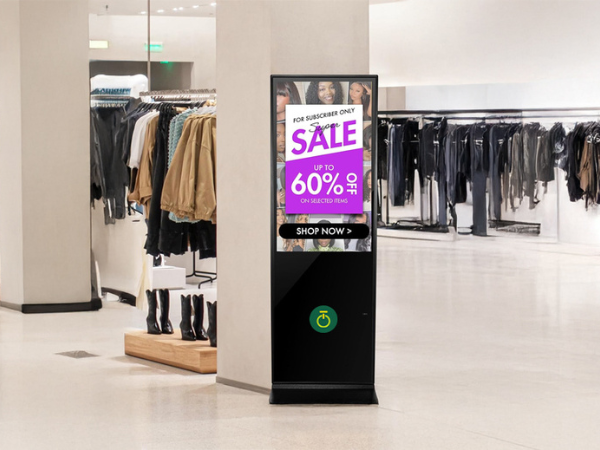
Retail businesses can use digital displays to highlight products, offers, new arrivals, seasonal campaigns, and brand messages.
A screen near an entrance might introduce a current promotion, while displays placed near product sections can provide additional information.
The content should be short, visually clear, and relevant to the location where the screen is installed.
2. Corporate Offices
Digital signage can also be used for internal communication and visitor-facing information.
Office displays may show company announcements, meeting information, welcome messages, event details, or other updates. Reception areas can use screens to communicate information without relying entirely on printed notices.
For organisations with multiple offices, a connected digital signage system can also make content management more convenient.
3. Hotels and Restaurants
Hospitality businesses have several opportunities to use digital displays.
Restaurants can use them for menus, promotions, featured dishes, or special offers. Hotels can use displays in reception areas, conference spaces, and common areas for guest information, event details, and directions.
When information changes frequently, digital content can be easier to update than printed material.
4. Healthcare Facilities
Healthcare environments often need to communicate information clearly and quickly.
Digital displays can support applications such as:
- Patient and visitor information
- Queue information
- Department directions
- Doctor availability
- Public announcements
- Wayfinding
Onfinity Technologies Pvt. Ltd. also identifies healthcare applications where displays can help with queues, doctor availability, patient guidance, and updates across departments.
5. Educational Institutions
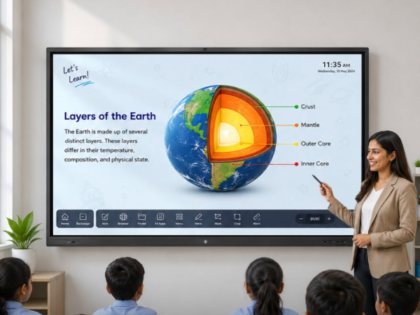
Schools, colleges, training centres, and other educational organisations can use digital signage for announcements, schedules, event information, campus directions, and other communication needs.
Digital signage can complement classroom technology rather than replacing interactive teaching systems.
For interactive teaching and presentation requirements, organisations can also explore the interactive flat panel solutions from Onfinity Technologies Pvt. Ltd..
6. Public and Government Facilities
Government offices, public buildings, transportation facilities, and other high-traffic environments can use digital displays to provide information to visitors and the public.
Depending on the application, screens can be used for directions, service information, announcements, schedules, and other public communication.
Onfinity Technologies Pvt. Ltd. also provides technology solutions for government and smart-city environments, including public information systems and display-based applications.
How to Use Digital Signage Effectively
Installing a display is only the beginning. The content and management strategy have a major role in how useful the system becomes.
Keep the Message Simple
People often view digital signage while walking through a store, office, hospital, or public space. They may only have a few seconds to understand the message.
Avoid filling the screen with long paragraphs. Use clear headings, readable text, suitable images, and one main message at a time.
Match the Content to the Location
The purpose of a screen should influence the content displayed on it.
For example:
- Retail entrances can highlight promotions.
- Reception areas can display welcome and visitor information.
- Restaurants can display menus and offers.
- Hospitals can provide directions and service information.
- Offices can share internal announcements.
There is no need for every screen in a building to display the same information.
Keep Content Updated
Outdated information can make a digital signage system less useful.
Businesses should establish a process for reviewing promotional messages, prices, schedules, announcements, and other time-sensitive content.
Onfinity Technologies Pvt. Ltd.’s digital signage kiosk solutions support network connectivity for remote updates and are available in touch and non-touch configurations. The company lists applications including retail promotions, corporate branding, events, public information, and wayfinding.
Consider the Viewing Environment
The physical location of a display matters.
Before installation, consider:
- Viewing distance
- Screen size
- Lighting conditions
- Glare
- Viewing angle
- Screen orientation
- Foot traffic
- Mounting position
- Power availability
- Network connectivity
A display that looks suitable in a showroom may not be the right choice for a bright outdoor location or a large public space.
Choosing the Right Digital Display
Different digital signage projects can require different display formats.
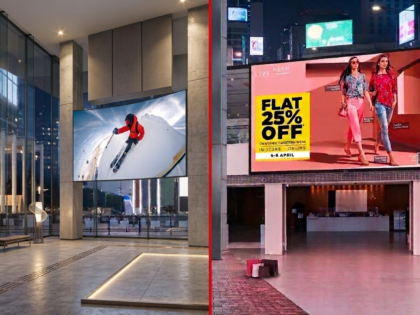
A standard commercial display may be suitable for an office, reception area, or retail environment. A kiosk may be more appropriate when visitors need to interact with the screen. For large visual installations, an LED video wall may be a better fit.
Onfinity Technologies Pvt. Ltd. provides digital signage and display solutions alongside self-service kiosks and other technology solutions for different environments.
For large-format requirements, LED video wall solutions from Onfinity Technologies Pvt. Ltd. are available for indoor and outdoor applications, including retail signage, shopping malls, sports arenas, building facades, and command centres.
The objective should be to select the display type that matches the viewing environment and communication requirement rather than simply choosing the largest available screen.
Digital Signage vs Self-Service Kiosks
Digital signage and self-service kiosks can both use digital displays, but their primary purposes are different.
Digital signage is generally designed to communicate information to an audience. The viewer consumes the information displayed on the screen.
A self-service kiosk is designed for user interaction. Depending on the application, users may browse information, find a location, access a service, complete a transaction, or enter information.
For example, a shopping mall could use digital signage to display promotional content while using a touchscreen kiosk to help visitors find stores.
Understanding this difference can help businesses choose the right technology for each location.
How to Plan a Digital Signage Project
A simple planning process can help businesses make better technology decisions.
Step 1: Define the Objective
Start by deciding what the display needs to achieve.
Is the goal advertising, customer information, wayfinding, internal communication, menus, or public information?
Step 2: Identify the Audience
Consider who will see or interact with the display.
Customers, employees, visitors, students, patients, and members of the public may all have different information needs.
Step 3: Evaluate the Location
Review the available space, viewing distance, lighting, foot traffic, installation position, and network requirements.
Step 4: Plan the Content
Decide what type of content will be displayed and how often it will need to change.
Step 5: Select the Display Format
Depending on the application, this could be a commercial display, digital signage kiosk, LED display, or another suitable format.
Step 6: Plan Content Management
Determine how content will be created, scheduled, updated, and monitored.
Step 7: Consider Long-Term Requirements
Installation is only one part of the project. Businesses should also consider maintenance, connectivity, service support, future expansion, and content management.
What Should You Consider Before Choosing a Digital Signage Solution?
Before investing in a digital signage system, consider:
- Display size and resolution
- Brightness and viewing conditions
- Indoor or outdoor environment
- Portrait or landscape orientation
- Connectivity options
- Content management requirements
- Remote update capabilities
- Installation requirements
- Maintenance and service
- Future scalability
There is no single configuration that works for every organisation. A retail store, hospital, corporate office, school, and outdoor public installation can have very different requirements.
Digital Signage Solutions From Onfinity Technologies Pvt. Ltd.
Onfinity Technologies Pvt. Ltd. provides display and digital signage solutions for educational, corporate, commercial, healthcare, government, retail, and other institutional environments. Its solution portfolio includes digital signage and display systems, self-service kiosks, LED displays, interactive flat panels, and other smart technology solutions.
The company’s digital signage kiosk range includes touch and non-touch options, portrait and landscape configurations, different screen sizes, and network connectivity for remote updates. These solutions can support applications such as wayfinding, public information, retail promotions, corporate branding, and event displays.
The most suitable solution will depend on the organisation’s objectives, location, audience, content requirements, and long-term operating needs.
Final Thoughts
Digital signage can be more than a screen used for advertising. When planned properly, it can help businesses communicate information, promote products, guide visitors, support customers, and create more organised digital experiences.
The best starting point is not the screen itself. First identify what you want to communicate, who needs to see it, where the display will be installed, and how frequently the content will change.
Once these requirements are clear, it becomes easier to select the appropriate display, connectivity, content management approach, and installation setup.
For businesses exploring digital signage solutions, Onfinity Technologies Pvt. Ltd. can provide different display and smart technology options based on the intended application and environment.
Frequently Asked Questions
Digital signage solutions are used to display dynamic information such as advertisements, promotions, menus, announcements, directions, schedules, product information, and other business messages.
Retail stores, offices, restaurants, hotels, hospitals, educational institutions, government facilities, malls, and other organisations can use digital signage for communication and information sharing.
Yes. Network-connected digital signage systems can support remote content updates when the hardware and content management setup provides this functionality. Onfinity Technologies Pvt. Ltd. offers network-connected kiosk configurations designed to support remote updates.
Digital signage primarily communicates information to viewers, while a self-service kiosk is designed for user interaction. A kiosk can support functions such as wayfinding, ticketing, bill payments, and visitor management depending on the implementation.
Start with the purpose, audience, location, viewing distance, lighting conditions, content requirements, connectivity, installation needs, and maintenance requirements. These factors can help determine the appropriate display format and configuration.