
Managing communication across multiple business locations can be challenging. A retail chain may need to promote the same campaign across several stores, while a corporate organisation may need to share announcements across offices in different cities. Educational institutions, hospitals, hotels and other multi-site organisations also need reliable ways to display relevant information at different locations.
Digital signage for multiple locations offers businesses a way to manage these communication needs through digital displays. With the right planning, organisations can maintain consistent messaging, update content more efficiently and adapt information to the needs of individual locations.
However, a successful multi-location digital signage project requires more than installing screens at different sites. Businesses must consider display selection, content management, network connectivity, installation, maintenance and future expansion.
This guide explains how to plan a digital signage system that supports business communication across multiple locations.
What Is Digital Signage for Multiple Locations?
Digital signage for multiple locations refers to the use of digital displays across different branches, offices, campuses, stores or facilities. These displays can present promotional messages, company announcements, visitor information, schedules, directions and other business-related content.
Depending on the system selected, an organisation may be able to manage content centrally while allowing individual locations to display information relevant to their audiences.
For example, a retail chain could distribute a national promotional campaign across its stores while allowing each branch to show local offers. A company with multiple offices could share corporate announcements while displaying location-specific meeting information at each site.
The exact setup depends on the display hardware, connectivity, content management tools and operational requirements of the organisation.
Why Do Multi-Location Businesses Need a Digital Signage Strategy?
As an organisation expands, maintaining consistent communication becomes more complicated. Printed notices and manual updates can require additional coordination, especially when information changes frequently.
A planned digital signage system can help address several common challenges.
1. Maintain Consistent Brand Communication
Businesses often need to display the same brand messages, product information or promotional campaigns across different locations.
Digital signage can help maintain a consistent visual identity by using approved templates, brand colours, logos and campaign materials. A central content process can also help reduce differences between displays at individual branches.
2. Simplify Content Updates
Updating screens individually can become time-consuming when a business operates many locations.
Network-connected displays with suitable remote management capabilities can allow authorised teams to update content without visiting every site. This can be useful when businesses need to change campaigns, announcements, schedules or other time-sensitive information.
3. Support Location-Specific Communication
Not every location has the same audience or communication requirements.
A corporate office may need to display visitor instructions and internal announcements, while a retail outlet may focus on product promotions. Educational campuses may require event schedules, campus notices and directional information.
A well-planned system can balance central brand control with content that is relevant to each location.
4. Prepare for Business Expansion
A digital signage setup should support the organisation’s current requirements while leaving room for future growth.
Businesses planning to open additional branches should consider whether their display selection, connectivity, content workflows and support arrangements can accommodate more locations without creating unnecessary complexity.
Key Factors to Consider Before Planning Multi-Location Digital Signage
Before selecting equipment or requesting quotations, businesses should clearly define the requirements of the project.
1. Identify the Purpose of Each Display
Start by identifying what the organisation wants to achieve with digital signage.
Possible objectives include:
- Promoting products and services.
- Sharing company announcements.
- Displaying visitor information.
- Supporting wayfinding in large facilities.
- Communicating schedules and event details.
- Improving information access in public-facing spaces.
The purpose of each screen should guide its placement, format and content. This helps avoid installing displays that do not serve a clear business need.
2. Assess the Requirements of Each Location
Different sites may have different physical conditions and operating needs.
For example, a screen in a small office reception area may require a different configuration from a large display in a shopping mall or a high-traffic public facility.
During the site assessment, consider:
- Available installation space.
- Viewing distance and screen size.
- Indoor or outdoor placement.
- Ambient lighting and glare.
- Portrait or landscape orientation.
- Power supply and network availability.
- Mounting arrangements and maintenance access.
Documenting these requirements for each site helps businesses choose suitable displays and plan installations more effectively.
3. Choose the Right Display Type
The most suitable display depends on how and where it will be used.
Commercial displays: These may be appropriate for office receptions, retail interiors, meeting areas and other indoor business environments.
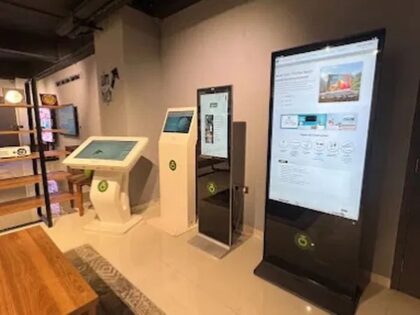
Digital signage kiosks: These can support promotional content, public information, wayfinding and other applications. Touch-enabled models may also support interactive experiences when configured for the intended use.
LED displays and video walls: These can be suitable for larger visual installations, including commercial spaces, building displays and selected public environments.
Businesses should evaluate brightness, resolution, screen size, operating environment, connectivity and installation requirements before finalising a configuration.
Onfinity Technologies offers digital signage kiosk solutions with different screen sizes and touch and non-touch configurations. The appropriate option depends on the project’s intended application and site requirements.
4. Plan Centralised Content Management
Content management is an important consideration when displays are installed across multiple locations.
Businesses should decide how content will be created, approved, scheduled and updated. They should also establish who can publish information and who is responsible for checking that displayed content remains accurate.
Depending on the system, a centralised workflow may include:
- Approved brand templates and creative assets.
- Separate content groups for different branches.
- Location-specific messages and promotions.
- Scheduled content changes.
- User permissions and approval processes.
- A process for removing expired information.
It is important to confirm which content management features are included in the proposed system. Network connectivity alone does not guarantee that every remote management or scheduling feature is available.
5. Check Network and Connectivity Requirements
Displays at different sites may rely on local networks, wired connections or wireless connectivity, depending on the hardware and installation.
Before deployment, involve the relevant IT team to review network access, security policies, bandwidth requirements and restrictions that may affect content delivery.
Businesses should also clarify what happens if a site temporarily loses connectivity. The ability to continue displaying previously loaded content depends on the hardware and software configuration, so it should be verified with the supplier.
Clear connectivity planning helps reduce avoidable installation issues and makes ongoing management more predictable.
How to Manage Digital Signage Across Different Locations
Once the hardware and connectivity requirements are established, businesses need a practical operating process.
Create a Central Content Policy
Develop guidelines covering brand identity, message approval, content formats and publishing responsibilities. This helps maintain consistency when several teams contribute to the signage network.
Group Locations by Business Need
Not every branch needs identical content. Locations can be organised according to region, business unit, store format, campus or facility type, where the chosen management system supports this arrangement.
This approach allows organisations to share common campaigns while retaining relevant local information.
Assign Clear Responsibilities
Define who manages the system centrally and who handles local requests. For example, a central marketing team might approve promotional campaigns, while branch managers provide location-specific information.
IT and facilities teams may also need defined responsibilities for connectivity, installation and technical support.
Review Content Regularly
Establish a schedule to check promotional dates, prices, announcements, schedules and other time-sensitive information. Remove expired campaigns promptly and ensure that location-specific details remain accurate.
Monitor Performance and Support Needs
Businesses should establish a process for reporting display issues, arranging maintenance and confirming that screens remain operational.
Before choosing a supplier, clarify the available service arrangements, support process, warranty terms and responsibility for maintenance across different sites.
A Practical Rollout Plan for Multi-Location Digital Signage
Rolling out digital signage across an entire organisation at once may not be the best approach. A phased deployment can help identify practical issues before the system expands.
Step 1: Define Project Requirements
List the business objectives, intended audiences, locations, content types and expected number of displays. Identify any requirements specific to individual sites.
Step 2: Select a Pilot Location
Choose one representative location for an initial installation. It should provide a useful test of the intended display type, connectivity and content workflow.
Step 3: Test the Complete Setup
Evaluate screen visibility, content readability, network performance, remote update processes and the responsibilities of the teams managing the system.
Record any issues that need to be resolved before wider deployment.
Step 4: Standardise the Installation Process
Create a checklist covering site readiness, power, connectivity, mounting, display configuration, content setup and handover.
Standardised procedures can make installations easier to coordinate across different locations.
Step 5: Expand in Phases
Once the pilot meets the project’s requirements, extend the system to additional sites in manageable groups. Apply the lessons learned from the initial installation to improve planning and coordination.
Step 6: Review and Improve
After deployment, review whether the system is meeting its original objectives. Consider display uptime, update accuracy, support requests, content relevance and feedback from the teams using it.
Common Mistakes to Avoid
A few planning mistakes can make a multi-location digital signage project more difficult to manage.
Choosing the same display for every site without assessment: Different locations may need different screen sizes, brightness levels, orientations or installation arrangements.
Assuming all systems offer the same remote management features: Confirm the supported content management, scheduling, monitoring and update capabilities before purchase.
Ignoring local requirements: Consistent branding is important, but information should still be relevant to each branch, campus or facility.
Leaving content ownership unclear: Without assigned responsibilities, messages can become outdated or remain on screens longer than intended.
Overlooking maintenance and support: A rollout plan should include servicing, issue reporting and technical support, not just initial installation.
Failing to plan for expansion: Consider how additional sites and screens will be integrated into the existing workflow before the organisation grows.
How Onfinity Technologies Can Support Your Digital Signage Requirements
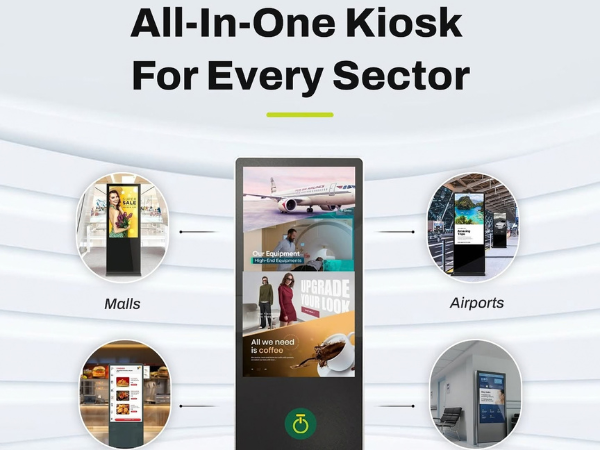
Onfinity Technologies provides digital signage and display solutions for businesses and institutions across different sectors. Its product range includes digital signage kiosks and commercial display options designed for applications such as corporate communication, retail promotions, public information and wayfinding.
For organisations planning displays across multiple locations, the selection process should begin with a clear assessment of site conditions, content requirements, connectivity and future expansion plans.
Onfinity’s digital signage kiosk solutions include network-connected configurations that support remote updates. Businesses can discuss their intended applications and technical requirements to determine which display options may be suitable.
To explore the wider range of available technologies, visit Onfinity Technologies and review its display and smart technology solutions.
Conclusion
Planning digital signage for multiple locations requires a coordinated approach to display selection, content management, connectivity, installation and ongoing support.
Businesses should begin by identifying what each screen needs to communicate and assessing the requirements of every site. A central content process, clear responsibilities and a phased rollout can help organisations maintain consistent messaging while accommodating local needs.
The right system should also be practical to maintain and flexible enough to support future expansion.
By planning these elements before installation, multi-location businesses can make more informed technology decisions and build a digital signage setup that supports their communication objectives over time.
Planning digital signage for your business locations? Contact Onfinity Technologies to discuss your display requirements and explore suitable options for your project.
Frequently Asked Questions
It is a digital display setup used across several branches, offices, campuses or facilities to communicate promotions, announcements, directions and other information. Depending on the system, content may be managed centrally or customised for individual locations.
Yes, when the selected hardware and content management setup support remote updates. Businesses should confirm the available connectivity, scheduling and management features before selecting a solution.
They can establish brand guidelines, approved templates, central publishing processes and regular content reviews. Location-specific messages can be managed separately where the system supports this functionality.
Retail chains, corporate groups, educational institutions, hospitals, hotels, banks and public-sector organisations may use digital signage to share information across multiple sites. The appropriate application depends on the organisation’s communication requirements.
Businesses should assess screen size, resolution, brightness, placement, connectivity, content management features, installation requirements, maintenance and service support. They should also check whether the system can accommodate additional locations in the future.