

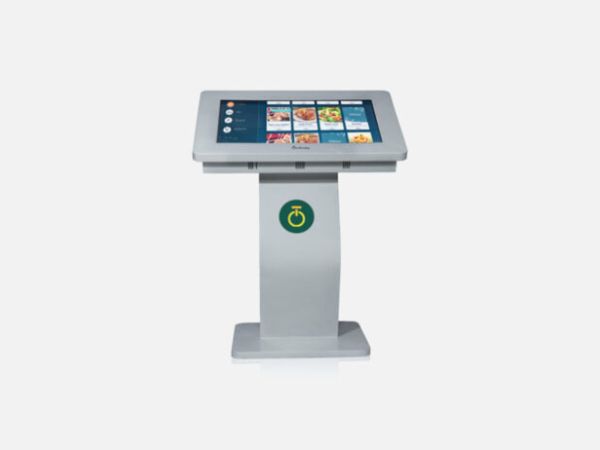
If you are planning to install a self-service kiosk, one of the first questions is how much it will cost. The answer depends on more than the screen size. Touch functionality, hardware, software, enclosure design, connectivity, and installation requirements can all affect the final quotation.
For example, a kiosk used to display public information may have different requirements from one that allows customers to interact with a service, browse products, or complete a transaction.
Understanding these differences helps businesses compare quotations more confidently and avoid paying for features they do not need.
In this guide, we explain the main factors that influence self-service kiosk price in India, what to check before requesting a quotation, and how to select a configuration that suits your business.
What Is a Self-Service Kiosk?
A self-service kiosk is a freestanding or mounted digital terminal that allows people to access information or perform specific tasks through a screen or interface.
Depending on its configuration and software, a kiosk may support activities such as:
- Finding directions inside a building
- Viewing product or service information
- Accessing visitor information
- Browsing promotions and announcements
- Interacting with a digital interface
- Accessing a business’s self-service application
The exact capabilities depend on the hardware, software, and integrations selected for the project.
Onfinity Technologies Pvt. Ltd. offers digital signage kiosks in different screen sizes, including touch and non-touch configurations, with portrait and landscape options. Its published product range also lists Android and Windows options, depending on the configuration.
You can explore the digital signage kiosk range to review the available options.
What Is the Price of a Self-Service Kiosk in India?
There is no single price that applies to every self-service kiosk. Two products may look similar but have different internal hardware, touchscreen technology, software requirements, and installation needs.
A reliable quotation should reflect the actual configuration rather than just the display size.
Before comparing prices, identify what the kiosk needs to do, where it will be installed, how people will interact with it, and whether it needs to connect with an existing business system.
These requirements provide a clearer starting point for evaluating costs.
1. Screen Size and Display Type
Screen size is one of the first specifications buyers notice.
A smaller kiosk may be suitable for basic information access or compact reception areas. A larger screen may be more practical when users need to read detailed information, browse products, or interact with a more complex interface.
However, a larger screen is not always necessary. The display should suit the task, the available installation space, and the distance from which users will interact with it.
When comparing quotations, check:
- The actual display size
- Screen orientation
- Display resolution
- Brightness requirements
- Whether the screen is intended for touch interaction
For instance, a kiosk used in a bright public area may have different display requirements from one installed in a controlled indoor environment.
2. Touchscreen or Non-Touch Configuration
Another important factor is whether the kiosk needs a touchscreen.
A non-touch kiosk may be suitable when its main purpose is to display information, advertisements, announcements, or directions.
A touchscreen kiosk is more appropriate when users need to select options, navigate menus, enter information, or interact with an application.
Touch functionality can affect the overall hardware configuration and cost. The exact difference depends on the display technology, screen size, and model.
Before selecting a touchscreen, consider how frequently people will use it, the expected interaction, and the physical environment.
The aim is to choose a configuration that supports the intended task without adding unnecessary complexity.
3. Hardware and Computing Configuration
The internal hardware determines how the kiosk runs its software and handles user interactions.
Depending on the application, the configuration may include a computing unit, memory, storage, operating system, and other components.
A kiosk used for a straightforward information display may not need the same computing resources as one running a more demanding business application.
When requesting a quotation, ask the supplier to clarify:
- Which operating system is included
- What processor and memory configuration is supplied
- How much storage is available
- Whether the computing unit is built in or separately configured
- Whether the hardware meets the requirements of your application
Onfinity Technologies Pvt. Ltd.’s kiosk range lists Android and Windows options, including Windows OPS configurations where applicable. The exact hardware and operating system should be confirmed for the selected model.
4. Kiosk Enclosure and Physical Design
The enclosure affects how a kiosk looks, where it can be installed, and how it can be accessed for maintenance.
A freestanding kiosk in a shopping centre may need a different structure from a unit placed on a counter or installed in a reception area.
Consider the following:
- Freestanding or mounted design
- Portrait or landscape orientation
- Available installation space
- Cable management
- Access for servicing
- Protection appropriate to the environment
- Appearance in relation to the surrounding space
A kiosk intended for a busy public location may have different physical requirements from one used by employees inside an office.
Discuss the installation environment before finalising the enclosure. A suitable design should balance appearance, accessibility, stability, and maintenance needs.
5. Software and Application Requirements
Hardware is only one part of a self-service kiosk. The software determines what users can actually do with it.
Some projects require only digital information or signage content. Others may need a dedicated interface for browsing products, accessing information, or connecting with an existing business application.
Software-related costs can depend on whether the project needs:
- A ready-made application
- A customised user interface
- Content management tools
- Integration with an existing system
- User authentication
- Transaction-related functionality
- Ongoing software maintenance
Not every kiosk includes these capabilities as standard.
Before comparing quotations, ask which software is included, whether any licence fees apply, and whether custom development is required. Also clarify who will manage updates and provide support after installation.
This is particularly important when a kiosk needs to work with existing business processes.
6. Connectivity and Additional Hardware
A kiosk may need to communicate with a network, receive remote updates, or connect with other equipment.
The required connections depend on how the system will be used.
For example, a kiosk that displays information may have simpler requirements than one that connects to a business application or uses additional peripherals.
Depending on the project, you may need to discuss:
- Wired or wireless network connectivity
- Available input and output ports
- Peripheral connections
- Remote content updates
- Network and security requirements
- Compatibility with existing systems
Do not assume that every connection or peripheral is included in the quoted price. Ask the supplier to specify which components are part of the proposed configuration and which are optional.
7. Installation and Site Requirements
The location of a kiosk can influence the total project cost.
A straightforward indoor installation may require less preparation than a site where power, network access, mounting, or other infrastructure needs to be arranged.
Before approving the quotation, confirm whether it covers:
- Delivery to the site
- Physical installation
- Power and network arrangements
- Mounting or placement requirements
- Initial configuration
- Testing and handover
- User guidance, where required
If the kiosk will be installed across several branches or locations, ask whether the supplier can provide a separate cost breakdown for each site.
This makes it easier to understand the full project budget instead of focusing only on the equipment price.
8. Maintenance, Warranty, and Support
The purchase price is not the only cost to consider.
A kiosk may need software updates, technical assistance, repairs, or replacement components during its working life. The type and frequency of support will depend on the equipment and how it is used.
Before placing an order, clarify:
- The warranty period and coverage
- What is excluded from the warranty
- How technical support is provided
- Whether maintenance visits are available
- Whether replacement components can be supplied
- Whether software support carries additional charges
These details help you understand the longer-term responsibilities associated with the kiosk.
A lower initial quotation may not represent better value if important services or required components are excluded.
9. How to Compare Self-Service Kiosk Quotations
When you receive quotations from different suppliers, compare the complete configurations rather than just the final numbers.
A practical comparison should include the following:
| What to compare | What to confirm |
|---|---|
| Display | Size, resolution, brightness, and orientation |
| Touch functionality | Whether touch is included and what technology is used |
| Computing hardware | Processor, memory, storage, and operating system |
| Enclosure | Design, mounting, and physical requirements |
| Software | Included applications, licences, and customisation |
| Connectivity | Network options and required ports |
| Installation | Delivery, setup, configuration, and testing |
| Support | Warranty, maintenance, and technical assistance |
| Additional costs | Optional components, integration, and recurring charges |
This comparison helps identify why two quotations differ and whether the proposed kiosk meets your actual requirements.
10. How to Choose the Right Kiosk for Your Business
The best starting point is to define the task the kiosk needs to perform.
For Retail Stores
Retailers may use kiosks to provide product information, help customers navigate information, or support selected self-service activities. The required touchscreen, application, and connectivity depend on the intended use.
For Corporate Offices
An office kiosk may support visitor information, directions, announcements, or other internal information needs. Consider where visitors or employees will use it and what information they need to access.
For Hospitals and Public Buildings
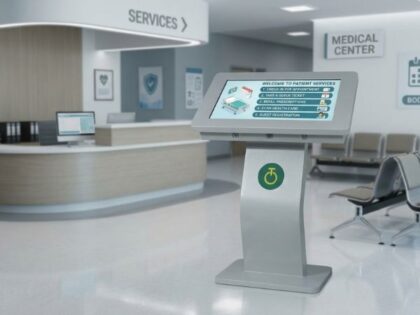
People may need clear directions, service information, or access to specific digital interfaces. Ease of use, readability, accessibility, and placement should be considered during planning.
For Events and Exhibition Spaces
A kiosk may be used to display information, present promotional material, or help visitors access event details. Screen orientation, portability requirements, and content updates may influence the configuration.
These are potential applications, not features that come standard with every kiosk. The software and hardware should be selected according to the intended task.
For a broader explanation of how kiosks differ from information-only displays, read our guide to digital signage for retail stores.
Self-Service Kiosk Solutions from Onfinity Technologies Pvt. Ltd.
Onfinity Technologies Pvt. Ltd. offers digital signage kiosks with options that include different screen sizes, touch and non-touch configurations, portrait and landscape layouts, and Android or Windows configurations, depending on the model.
The published range includes kiosk formats such as vertical and horizontal units. The appropriate choice depends on the installation environment and the intended use.
To evaluate a suitable configuration, review the Onfinity digital signage kiosk range and discuss your requirements with the company.
When requesting a quotation, provide details about the screen size, touch requirements, operating system, software, connectivity, installation location, and expected usage. This helps the supplier recommend a configuration that matches the project rather than relying on a generic estimate.
Final Thoughts
The price of a self-service kiosk in India depends on the combination of display, touchscreen, computing hardware, enclosure, software, connectivity, installation, and support.
There is no need to choose the most complex configuration if your application does not require it. At the same time, selecting a kiosk without checking its software, hardware, or installation requirements can lead to additional costs later.
Start by defining what users need to do, where the kiosk will be installed, and how it should connect with your existing systems. Then compare complete quotations and confirm which features and services are included.
This approach helps you make a more informed decision and select a kiosk that fits your operational needs and budget.
Frequently Asked Questions
The main factors include screen size, touch functionality, computing hardware, enclosure design, operating system, software, connectivity, installation, and support. The final price depends on the selected configuration.
Touch functionality can affect the equipment cost, but the actual difference depends on the screen technology, size, model, and configuration. Compare quotations for equivalent specifications before deciding.
This varies by product and project. Confirm which applications, licences, content tools, and integrations are included in the quotation and whether any additional fees apply.
Some kiosk configurations support Android, while others offer Windows options. The available operating system depends on the selected model and hardware configuration.
Check the display, touch functionality, hardware, software, connectivity, enclosure, installation requirements, warranty, and ongoing support. Also confirm whether the kiosk can perform the specific tasks your business needs.
Not necessarily. Ask the supplier to clarify whether delivery, installation, configuration, warranty, maintenance, and technical support are included or charged separately.
Potential applications include retail stores, corporate offices, hospitals, shopping centres, event venues, and public buildings. The appropriate configuration depends on the task and installation environment.



1 Comment