
Retail stores need to communicate with customers quickly. From promoting a new product to displaying a limited-time offer, the right message can help shoppers find useful information while they move through the store. Digital signage for retail stores gives businesses a flexible way to display promotions, product information, prices, announcements, and other content on digital screens.
Unlike printed posters, digital displays can be updated without replacing physical material. Retailers can also change content based on promotions, seasons, product launches, or different times of the day.
What Is Digital Signage for Retail Stores?
Digital signage for retail stores uses screens to display digital content inside or around a retail environment. Depending on the store and its requirements, screens can be placed at entrances, windows, product sections, checkout areas, counters, or other high-visibility locations.
The content may include:
- Product promotions
- Discounts and special offers
- New product announcements
- Seasonal campaigns
- Product information
- Brand messages
- Store announcements
- Directions and other customer information
The main advantage is flexibility. Retail teams can update the message on a screen without printing and installing a new poster.
How Retail Stores Can Use Digital Signage
Digital signage can support different stages of the customer journey. The right placement and content depend on the type of store and what the retailer wants customers to do.
1. Promote Offers at the Store Entrance
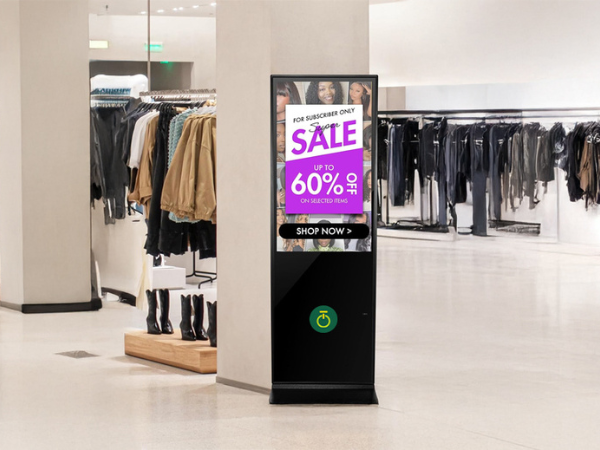
The entrance is one of the first places where customers see a retail store’s messaging. A digital display can highlight current discounts, seasonal promotions, new arrivals, or special campaigns.
For example, a clothing store may display a weekend sale, while an electronics store can highlight a new product launch.
The message should be easy to understand within a few seconds.
2. Highlight New Products
Retailers can use digital screens to introduce new products or draw attention to selected items.
A product display can include:
- Product name
- Key features
- Price or offer
- Product images or videos
- A short call to action
This can provide additional information without requiring large amounts of printed material around the store.
3. Create Digital Window Displays
Store windows are important for attracting people passing outside. Instead of relying only on static posters, retailers can use digital displays to show changing promotions, product videos, seasonal campaigns, or brand content.
This can be particularly useful for stores located in shopping malls and busy commercial areas.
4. Share Product Information
Customers sometimes need more information before making a purchase. Digital screens placed near relevant products can help communicate specifications, features, available options, or usage information.
For example, an electronics retailer could use a screen to explain the features of a television, while a furniture store could show product dimensions and available finishes.
5. Promote Seasonal Campaigns
Retail promotions often change throughout the year. Digital signage makes it easier to update content for events such as festive sales, seasonal collections, new launches, and clearance campaigns.
Instead of creating and replacing multiple printed materials, retailers can update the content shown on their screens.
6. Improve Checkout and Counter Communication
Digital screens near checkout areas can display relevant offers, membership information, payment instructions, or promotional messages.
The content should remain simple because customers usually have limited time to read it while waiting or completing a purchase.
Benefits of Digital Signage for Retail Businesses
Flexible Content Updates
One of the biggest advantages of digital signage is the ability to change content when required. Retailers can update promotions, product information, and announcements without replacing printed displays.
Better Use of Store Space
Digital screens can provide information without taking up the same type of physical space as multiple posters or printed signs.
Support for Promotional Campaigns
Retailers can use different messages for different campaigns and update them as promotions change.
More Consistent Brand Communication
A centrally managed digital display system can help retailers maintain consistent branding, messaging, images, and promotional content across different screens or locations.
Useful for Multiple Store Locations
Businesses with several outlets can use digital signage to maintain similar promotional messaging across stores while still adapting content for individual locations.
How to Create Effective Retail Digital Signage Content
Having a screen in a store is not enough. The content needs to be designed around the customer’s environment.
Keep Messages Short
Customers may only look at a screen for a few seconds. Use short headlines and focus on the most important information.
Use Clear Visuals
Product images, simple graphics, and short videos can help communicate information quickly. Avoid filling the screen with too much text.
Match Content With Screen Location
A display near the entrance may focus on promotions, while a screen near a product section may provide product information.
The content should match what customers are likely to need at that location.
Update Content Regularly
Old promotions can reduce the usefulness of a digital display. Retailers should review their content regularly and remove offers or information that are no longer relevant.
Include a Clear Action
When appropriate, tell customers what to do next. This could be visiting a product section, asking a staff member, checking an offer, or learning more about a product.
Digital Signage vs Self-Service Kiosk in Retail
Digital signage and self-service kiosks can both be used in retail stores, but they serve different purposes.
Digital signage is mainly used to communicate information, promotions, products, and brand messages to customers.
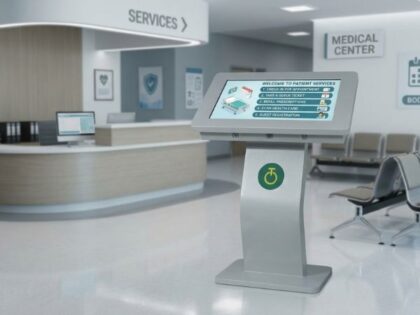
Self-service kiosks allow customers to interact with a system and perform actions such as browsing products, checking information, placing orders, or accessing services.
A retailer may use both technologies in the same store. For example, digital signage can promote a product while a nearby kiosk allows customers to explore its details or complete a related task.
Choosing the Right Display for a Retail Store
The right display depends on where it will be installed and what it needs to show.
Retailers should consider:
- Screen size
- Indoor or outdoor installation
- Viewing distance
- Brightness requirements
- Content type
- Screen orientation
- Operating environment
- Connectivity
- Content management
- Installation requirements
- Future expansion
A smaller screen may work well for product information, while larger displays or LED solutions may be more suitable for storefronts, malls, or large promotional areas.
Planning Digital Signage for Different Retail Environments
There is no single setup that works for every retail business.
A small retail store may only need a few displays for promotions and product information.
A large showroom may require several screens placed across different product sections.
A shopping mall or large commercial space may use larger digital displays or LED solutions for high-visibility campaigns.
The important point is to plan the technology around the store layout, customer movement, content requirements, and business goals.
Digital Signage Solutions from Onfinity Technologies Pvt. Ltd.
Onfinity Technologies Pvt. Ltd. provides digital display and signage solutions designed for different business environments.Its solutions can support retail applications where businesses need to communicate promotions, product information, brand messages, and other content through digital displays.
Depending on the requirement, retailers can explore digital signage displays, kiosks, LED display solutions, and other commercial display technologies.
The right setup should be selected based on the store environment, viewing distance, content requirements, installation location, and intended customer interaction.
Final Thoughts
Digital signage can help retail stores communicate promotions, product information, seasonal campaigns, and brand messages in a more flexible way. The most effective setup depends on the store layout, customer journey, display location, and type of content being shown.
Instead of simply adding screens to a store, retailers should first identify where customers need information and what each display should communicate. This approach can help create a more useful and organised digital signage setup.
Frequently Asked Questions
Digital signage for retail stores uses digital screens to display promotions, product information, announcements, brand content, and other messages to customers.
Common locations include store entrances, windows, product sections, checkout areas, counters, and other high-visibility locations.
Yes. Digital signage systems can allow businesses to update displayed content without replacing printed posters or signs.
Yes. A small store can use a limited number of strategically placed displays for promotions, product information, or important announcements.
Digital signage mainly communicates information to customers, while a self-service kiosk is designed for customer interaction and specific self-service activities.