
Hybrid meetings have become a normal part of modern business. Teams may have people sitting in the same room while others join from different offices, cities, or countries. Without the right setup, this can lead to poor audio, unclear video, difficult screen sharing, and participants feeling disconnected.
A well-planned hybrid meeting room setup solves these problems by combining the right camera, microphone, display, speakers, connectivity, and collaboration software. The goal is not simply to add more technology, but to create a meeting environment where everyone can see, hear, and participate easily.
In this guide, we will explain the essential components of a hybrid meeting room, how to plan the setup, common mistakes to avoid, and how modern meeting technology can improve collaboration.
What Is a Hybrid Meeting Room Setup?
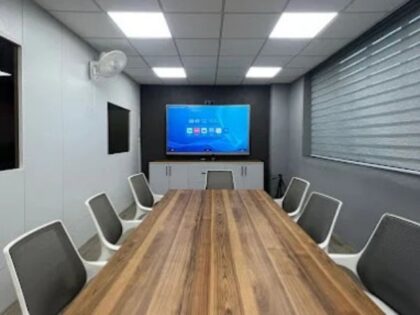
A hybrid meeting room setup combines video, audio, display, connectivity, and collaboration technologies to connect in-room and remote participants. A practical setup typically includes a professional camera, microphones, speakers, a meeting display, reliable network connectivity, and compatible conferencing software.
What Makes a Hybrid Meeting Room Effective?
The best hybrid meeting rooms focus on one simple objective: make remote participants feel like they are genuinely part of the room.
A successful setup should provide:
- Clear video of everyone in the room
- Consistent and intelligible audio
- Easy content sharing
- A suitable display for remote participants
- Reliable connectivity
- Simple controls for starting and managing meetings
- Compatibility with commonly used conferencing platforms
These elements need to work together. A high-quality camera cannot compensate for poor microphones, just as a large display cannot fix an unstable network connection.
Essential Components of a Hybrid Meeting Room
1. Professional Video Camera
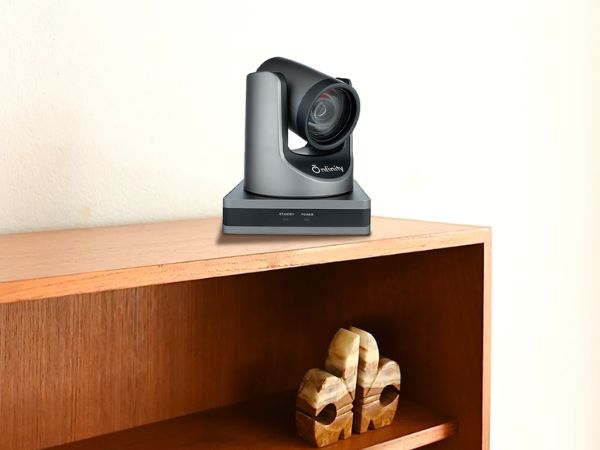
A professional video conferencing camera is one of the most important components of a hybrid meeting room. The appropriate camera depends on room size, seating arrangement, viewing distance, and meeting requirements.
For example, larger boardrooms may benefit from PTZ cameras with powerful optical zoom, while smaller huddle spaces may require a wide-angle camera that can capture everyone around a table.
Important camera features can include:
- Full HD or 4K video
- Wide field of view
- PTZ functionality
- Auto-tracking or auto-framing
- Optical zoom
- Flexible mounting options
- USB or HDMI connectivity
Onfinity’s video conferencing range includes solutions such as 4K/UHD PTZ and fixed-lens cameras, wide-angle cameras, huddle-room cameras, auto-tracking cameras, lecture-recording cameras, and endpoint solutions. The range also includes options with high-quality optics, wide viewing angles, built-in audio, and compatibility with third-party or cloud-based conferencing solutions.
2. Microphones and Speakers
Audio quality is just as important as video.
Remote participants should be able to hear every speaker without excessive background noise, echo, or interruptions. Depending on the room, you may use built-in microphones, tabletop speakerphones, ceiling microphones, or dedicated audio systems.
When evaluating audio equipment, consider:
- Microphone pickup range
- Noise reduction
- Echo cancellation
- Number of participants
- Room acoustics
- Speaker placement
Onfinity’s conferencing range also includes speakerphones with omnidirectional microphones and camera systems with integrated audio options.
3. Large and Appropriate Meeting Display
A meeting room display allows participants to view remote attendees, presentations, documents, dashboards, and other shared content.
The display size should match the room rather than simply being as large as possible.
| Room Type | Practical Consideration |
|---|---|
| Small huddle room | Compact display with wide viewing angles |
| Medium meeting room | Larger display for comfortable viewing |
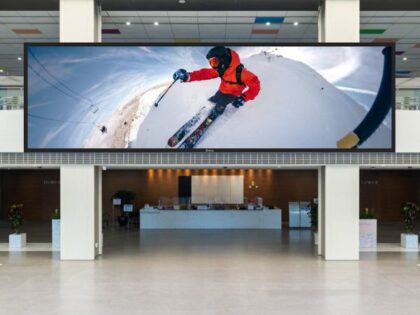
| Large boardroom | Large-format display or multiple displays |
A dual-display arrangement can be useful in larger rooms, allowing one screen to show participants while another displays shared content.
4. Reliable Connectivity
Even excellent meeting hardware can perform poorly when the network is unreliable.
Your room should have:
- Stable internet connectivity
- Adequate bandwidth
- Low network latency
- Reliable Wi-Fi or wired connectivity
- Properly configured conferencing devices
For critical meeting rooms, wired network connections can provide greater consistency than relying only on wireless connections.
5. Video Conferencing and Collaboration Software
Hardware needs software to connect participants.
Organizations may use platforms such as Microsoft Teams, Zoom, Google Meet, or other cloud-based conferencing solutions. Before choosing equipment, confirm that the hardware works with the platforms used by your organization.
Onfinity’s conferencing products are designed for use with third-party and cloud-based video conference solutions.
6. Easy-to-Use Room Controls
Technology should simplify meetings rather than make them harder.
A good room setup should make it easy to:
- Start a meeting
- Join participants
- Adjust the camera
- Mute or unmute microphones
- Share a screen
- End the meeting
Simple controls are particularly important for shared meeting rooms used by multiple teams.
How to Build a Hybrid Meeting Room Step by Step
Step 1: Assess the Room
Start by understanding the physical space.
Consider:
- Number of seats
- Table shape and size
- Distance between participants and display
- Camera position
- Lighting
- Acoustic conditions
- Available power and network connections
Room assessment prevents you from choosing equipment based only on specifications.
Step 2: Define Your Meeting Needs
Ask how the room will actually be used.
Will it mainly support internal team meetings, client presentations, interviews, training sessions, executive meetings, or hybrid workshops? A boardroom used for client meetings may need different equipment from a small team huddle room.
Step 3: Select the Right Camera
Choose the camera according to room size and participant positioning.
A wide-angle camera may be suitable for a compact meeting room. A PTZ camera can be more practical for larger rooms where participants sit farther from the display.
For specialized environments, features such as auto-tracking, high optical zoom, or lecture recording may be useful.
Step 4: Plan Audio Coverage
Check whether every seat can be heard clearly.
Avoid placing microphones too far away or relying on a single microphone for a large room. Consider room acoustics and potential echo before finalizing the audio design.
Step 5: Choose the Display
Select a display that allows both local and remote participants to view content comfortably.
Think about viewing distance, room lighting, resolution, and whether two screens would improve productivity.
Step 6: Connect the System
Once the hardware is selected, configure the camera, microphones, speakers, display, computer or conferencing endpoint, network, and collaboration platform. Test every connection before the room goes live.
Step 7: Test With Real Meetings
A technical checklist is useful, but real-world testing is even better.
Run a complete meeting with remote participants and check:
- Can everyone be seen?
- Can everyone be heard?
- Is shared content readable?
- Is there echo?
- Is the camera framing appropriate?
- Is the connection stable?
Fixing these issues during setup is much easier than discovering them during an important client meeting.
Hybrid Meeting Room Setup: Small vs Large Rooms
Small Meeting Rooms
Small rooms generally need:
- Wide-angle camera
- Integrated microphone or compact speakerphone
- Single display
- Simple USB connectivity
- Easy meeting controls
The priority is broad coverage without unnecessary complexity.
Large Conference Rooms
Large rooms often benefit from:
- PTZ cameras
- Higher optical zoom
- Multiple microphones
- More powerful speakers
- Large displays or multiple screens
- Dedicated conferencing equipment
For large spaces, camera placement and audio coverage become particularly important.
Common Hybrid Meeting Room Mistakes to Avoid
Choosing Equipment Based Only on Resolution
A 4K camera does not automatically create a better meeting experience. Field of view, optics, framing, lighting, audio quality, and room layout also matter.
Ignoring Acoustics
Hard walls, glass surfaces, and large empty spaces can create reflections and echo. Audio planning should be part of the room design from the beginning.
Installing the Camera in the Wrong Position
A camera positioned too high, too low, or too far from participants can produce awkward framing.
Overcomplicating the System
More devices do not necessarily mean better meetings. Equipment should match the room’s actual requirements.
Forgetting Remote Participants
A hybrid meeting should be designed for both people in the room and people joining remotely. Remote attendees should have a clear view, understandable audio, and easy access to shared content.
How Smart Meeting Room Technology Improves Collaboration
Modern meeting technology can make communication more natural and efficient.
Features such as auto-framing, tracking, wide-angle views, high-definition video, and flexible connectivity can reduce manual adjustments and keep attention focused on the conversation.
For example, auto-framing can help keep participants visible as people enter or leave the conversation, while wide-angle views can make smaller meeting spaces easier to cover.
The bigger benefit is consistency. Teams should be able to walk into a meeting room and start a professional meeting without spending several minutes troubleshooting equipment.
Why the Right Hybrid Meeting Room Setup Matters
A properly designed meeting room can help organizations:
- Improve communication between distributed teams
- Create better experiences for clients and partners
- Reduce meeting disruptions
- Support flexible and hybrid work models
- Improve collaboration during presentations
- Make technology easier for employees to use
The objective is not to build the most complicated room possible. It is to build a room where technology works quietly in the background and people can focus on the discussion.
Final Takeaway
Building an efficient hybrid meeting room setup is about creating a seamless experience for people both inside and outside the room. The right combination of camera, audio, display, connectivity, and collaboration software can make meetings clearer, easier, and more productive.
Start with the room itself, understand how your teams use it, and then choose technology that matches those requirements. Instead of focusing on individual specifications alone, look at how every component works together.
For organizations exploring professional meeting-room technology, Onfinity Technologies offers a range of video conferencing solutions designed for different environments, including boardrooms, classrooms, huddle rooms, and remote meeting applications.
Ready to Upgrade Your Meeting Room?
Explore Onfinity’s video conferencing products to find solutions designed to support clearer communication, flexible meeting environments, and more effective hybrid collaboration.
Frequently Asked Questions
The camera and audio system are among the most important components, but the best results come from integrating the camera, microphones, speakers, display, network, and conferencing software into one reliable system.
It depends on the room. Wide-angle cameras can work well in smaller spaces, while PTZ cameras with optical zoom may be better suited to larger conference rooms.
Not always. Resolution is only one factor. Field of view, image quality, camera optics, lighting, framing, and audio quality also influence the meeting experience.
There is no universal number. Microphone requirements depend on room size, participant count, microphone pickup range, furniture layout, and acoustic conditions.
Many modern conferencing devices are designed to work with multiple platforms. Always check compatibility before purchasing equipment.
Start with microphone placement and room acoustics. Use suitable microphones, minimize background noise, and ensure the audio system supports echo and noise reduction where appropriate.
Evaluate room size, participant count, camera coverage, audio requirements, display needs, connectivity, conferencing software compatibility, ease of use, and future scalability.
Meeting rooms should be tested regularly, especially after software updates, hardware changes, network changes, or reports of audio or video problems.