
Walk into most schools and offices built before 2020, and you’ll still find the same setup: a whiteboard, a projector with a cable trailing across the floor, and someone hunting for a marker that still works before the session can start.
The replacement device now goes by a dozen names: smart board, digital board, interactive whiteboard, touchscreen display, collaboration panel. That makes it genuinely hard for a school principal or an office facilities manager to tell whether they’re comparing the same product across vendors, or paying extra for features they’ll never use.
This guide breaks down what an interactive flat panel display actually is, how a classroom uses one differently from a boardroom, and exactly what to check before you sign a purchase order.
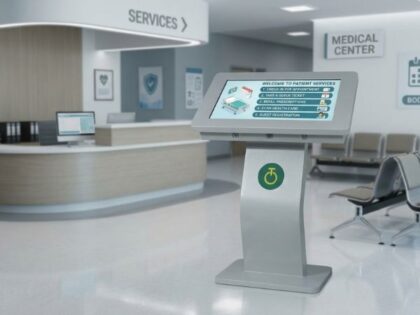
An interactive flat panel display (IFPD) is a large touchscreen, typically 55 to 98 inches, that combines a 4K display with built-in software for writing, screen sharing and running apps. Schools use it as a digital classroom board; offices use it for meetings and hybrid collaboration. It replaces a whiteboard, projector and screen-sharing device in one unit.
What Is an Interactive Flat Panel Display?
An interactive flat panel display is a touch-enabled 4K screen that runs its own operating system, so it functions as a standalone computer, not just a monitor. Users write on it with a finger or stylus, share content wirelessly from a laptop or phone, and run built-in apps for whiteboarding, presentations or video calls.
The same device gets called different names depending on where it’s used. In classrooms, it’s usually called a smart board. In offices, it’s more often called a touchscreen collaboration display or digital whiteboard. There’s no meaningful spec difference between them, so if a vendor quotes you a “smart board” for a boardroom, you’re still comparing an interactive flat panel display.
The Technology Behind It
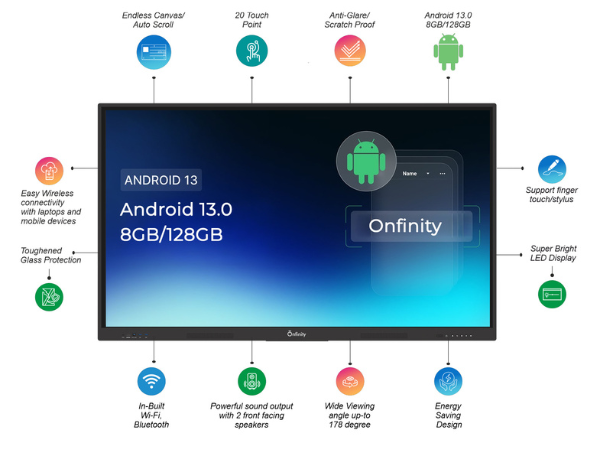
- Touch technology: infrared or capacitive touch sensors, usually supporting 20 or more simultaneous touch points
- 4K UHD panel for sharp text and video even at large screen sizes
- Embedded OS (typically Android) for running whiteboard and presentation apps without a separate PC
- OPS slot to plug in a Windows PC when you need specific desktop software
- Wireless casting to mirror a laptop, tablet or phone screen without cables
Interactive Flat Panel Display Use Cases: Classrooms vs Corporate Offices
The hardware is largely the same across both settings. What changes is which features actually get used day to day.
In Schools
- Daily lessons written and saved directly on the panel, ready to reopen the next class
- Multi-touch group activities where several students interact with the screen at once
- Pulling up videos, diagrams and curriculum content without switching devices
- Pairing with a camera for students joining remotely
In Corporate Offices
- Boardroom presentations with live annotation over slides or documents
- Brainstorming sessions where the whole room can write and move ideas on screen
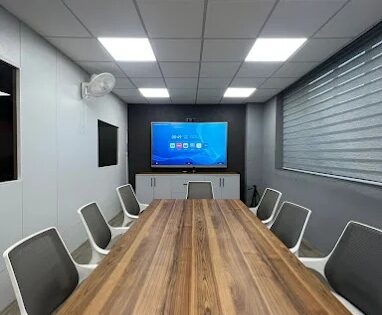
- Hybrid meetings, when paired with a video conferencing camera, so remote and in-room attendees see the same screen
- Quick syncs in huddle rooms, where a smaller panel replaces a standalone monitor and a separate conferencing setup
| Priority | Schools | Corporate Offices |
|---|---|---|
| Daily durability | High | Medium |
| Curriculum/whiteboard software | High | Low |
| Video conferencing integration | Medium | High |
| Multi-user annotation | High | High |
| Typical screen size | 65″–75″ | 55″–86″ depending on room |
Key Features That Matter for Business-Grade Interactive Displays
Whether you’re outfitting a classroom or a conference room, these are the specs that actually affect daily use:
- 4K UHD display with good brightness for rooms with natural light
- Multi-touch support, ideally 20+ points, for group use rather than one person at a time
- Wireless screen sharing so anyone can cast from their own device without hunting for a cable
- OPS slot for a Windows PC when specific software is non-negotiable
- Remote device management, so an IT team can monitor and update panels across multiple rooms or campuses without visiting each one
- Warranty and local support, since a panel running most of the working day needs a vendor who responds fast
Interactive Flat Panel Display vs Smart TV vs LED Video Wall: Which One Fits Your Space?
Not every room needs a touch panel. Here’s how the three compare:
| Display Type | Touch Interactive | Best For | Typical Room |
|---|---|---|---|
| Interactive Flat Panel | Yes | Teaching, meetings, brainstorming | Classroom, boardroom, huddle room |
| Smart 4K TV | No | Notices, media playback, presentations | Reception, common areas, small offices |
| LED Video Wall | Usually no | Large-format branding, control rooms, auditoriums | Lobbies, large halls, command centres |
If people need to write on, annotate or control the screen directly, get an interactive flat panel. If you just need a large display for content or announcements, a smart TV or video wall is the more cost-effective choice.
How to Choose the Right Interactive Flat Panel Display: Step by Step
- Define the primary use case. Teaching a class and running client meetings put weight on different features, decide which matters most before comparing specs.
- Match screen size to the room. A panel too small loses visibility at the back; one too large in a small huddle room wastes budget.
- List your integration needs. Confirm the panel supports your video conferencing platform, LMS or specific desktop software before you buy.
- Set a realistic budget band. Price scales with screen size and touch technology, decide your range before you start getting quotes.
- Check IT manageability. If you’re buying for more than one room, remote device monitoring saves significant time over the panel’s lifetime.
- Confirm warranty and local support. A panel used daily needs a vendor who can respond quickly, not just a manufacturer’s helpline.
What Affects Interactive Flat Panel Display Pricing
- Screen size, the single biggest driver, larger panels cost significantly more
- Touch technology, infrared panels are typically more affordable than capacitive
- Operating system and OPS slot, panels with a Windows PC slot cost more than Android-only units
- Brand and build quality, particularly panels rated for Indian power and dust conditions
- Installation and AMC, mounting, setup and annual maintenance contracts add to the total cost of ownership
Industry Snapshot: Why Adoption Is Accelerating
This isn’t a niche upgrade anymore. The global interactive flat panel display market was valued at roughly USD 12.6 billion in 2024 and is projected to keep growing at over 7.5% a year through 2034, according to Global Market Insights. In India specifically, state-level digital classroom programmes procured an estimated 1.4 million IFPD units between 2022 and 2025, per Dataintelo’s market research, and adoption in corporate offices is following the same curve as hybrid work makes video-integrated meeting rooms the default rather than the exception.
Why Businesses and Schools Choose Onfinity’s Interactive Flat Panel Displays
Onfinity’s interactive flat panels are built for Indian conditions specifically, with plug-and-play, single-cable deployment and remote device monitoring so IT teams can manage panels across classrooms, boardrooms or multiple campuses without an on-site visit for every issue. The Ignite, Maxim and Bloom series cover different room sizes and budgets, and the same panels are already deployed across education, enterprise, healthcare, government, retail, BFSI and defence settings, not just one sector.
Explore Onfinity’s interactive flat panel range to compare series and specifications. If you’re specifically outfitting classrooms, our dedicated smart board for classroom guide covers education-specific buying criteria in more depth.
FAQs
What is an interactive flat panel display used for?
It’s used as a touch-enabled display for teaching, presenting and collaborating, combining a whiteboard, projector and screen-sharing device into one 4K panel. Schools use it for daily lessons; offices use it for meetings and brainstorming sessions.
What’s the difference between an interactive flat panel display and a smart board?
None functionally. “Smart board” is simply the term commonly used in education, while “interactive flat panel display” is the broader industry term covering the same device used in schools, offices and other settings.
Can the same interactive flat panel work for both a classroom and a meeting room?
Yes. The core hardware is identical; what differs is the software and accessories you pair it with, curriculum apps and a document camera for classrooms, video conferencing integration for meeting rooms.
What screen size is right for a boardroom vs a classroom?
Boardrooms and huddle rooms typically work well with 55″ to 65″ panels given closer viewing distances. Classrooms usually need 65″ to 75″, with 86″ for larger halls or auditoriums.
Do interactive flat panel displays support video conferencing?
Most do, either through a built-in camera and microphone or by pairing with an external conferencing camera. Check this specifically if hybrid meetings are a priority, not all panels include conferencing hardware by default.
How long does an interactive flat panel display typically last?
With regular use, most business-grade panels are built for 5 to 7 years of daily operation, though this depends heavily on build quality and how well it handles local power conditions.
Is an interactive flat panel display better than a smart TV for meetings?
For meetings that involve annotation, whiteboarding or live collaboration, yes. For rooms that only need to display content without interaction, a smart TV is a simpler and more affordable choice.
What should IT teams check before buying panels for multiple rooms?
Prioritize remote device management so panels can be monitored and updated centrally, confirm software compatibility across all rooms, and negotiate a single support contract rather than per-unit warranties to simplify servicing.