
Hospitals welcome patients throughout the day, and managing their arrival can be challenging. People come for appointments, diagnostic tests, consultations, follow-up visits and emergency care. At busy reception desks, patients may have to wait to confirm appointments, find the right department or understand where they need to go next.
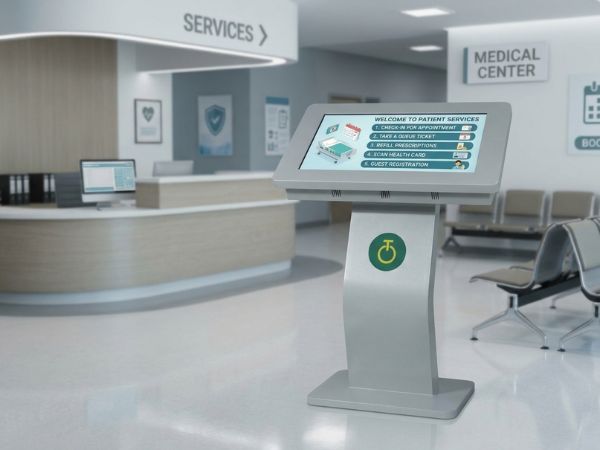
A self-service kiosk in hospitals can help make these routine processes more organised. Depending on its software and integration with existing hospital systems, a kiosk can allow patients to access information, check appointment details, complete selected check-in steps and find directions without relying entirely on reception staff.
For hospitals exploring digital technology, self-service kiosks offer a practical way to improve everyday communication and make the patient journey easier to navigate.
1. Making Patient Check-In More Convenient
Patient check-in is often one of the first interactions a person has with a hospital. When several appointments begin around the same time, reception teams may need to handle registration questions, appointment confirmations and general enquiries together.
A patient check-in kiosk can support this process by providing a simple on-screen interface. If connected to the hospital’s appointment or registration system, it may allow patients to confirm their details, check an appointment or complete specific registration steps.
This can help separate routine digital tasks from enquiries that need personal attention. Reception staff can then focus on patients who need assistance, have complex requirements or are unfamiliar with the registration process.
The exact functionality depends on the hospital’s software, the kiosk configuration and the systems available for integration.
2. Helping Hospitals Organise Patient Queues
Long or confusing queues can make hospital visits more stressful. Patients may not know where to wait, which counter to approach or whether they are in the correct line for their appointment.
Self-service kiosk solutions can support queue management when connected to a suitable queue or appointment system. For example, the interface may guide patients through the next step after check-in, provide a queue reference or direct them to the appropriate service counter.
When combined with suitable display screens, hospitals can also communicate queue updates and general instructions in waiting areas.
A kiosk alone does not automatically manage hospital queues. To provide these functions, it must work with software configured for the hospital’s workflow. Clear instructions and a staff-assisted option should remain available for patients who need help.
3. Making Hospital Departments Easier to Find
Large hospitals can be difficult to navigate, especially for first-time visitors. Outpatient departments, laboratories, imaging centres, pharmacies and specialist clinics may be located in different parts of a building.
A self-service information kiosk can provide digital directions, department details, floor information and guidance about where patients should go next. Users can consult the information on screen rather than asking reception staff for every routine direction.
Hospitals can also use digital signage displays to share floor maps, announcements and general visitor information in prominent locations.
The goal is to make information easy to find. Clear labels, readable text, simple navigation and accurate directions are essential for a useful hospital wayfinding solution.
4. Reducing Routine Enquiries at Reception
Reception teams often answer the same questions throughout the day: Where is the laboratory? Which floor has the cardiology department? Where should visitors wait? What time does a particular service begin?
A well-planned hospital kiosk can make approved information available directly to visitors. This may include department locations, service timings, appointment instructions and other frequently requested details.
By making routine information accessible on screen, hospitals can help staff spend more time supporting people who require individual attention.
However, digital information should complement hospital staff rather than replace them. Patients with mobility challenges, language barriers, urgent concerns or difficulty using the kiosk should still be able to receive personal assistance.
5. Improving the Patient Experience Through Clear Information
A hospital visit can involve several steps, and uncertainty about what to do next often adds to the stress. A clear digital interface can help patients understand the process and locate the information they need.
When planning healthcare kiosk solutions, hospitals should consider:
- Simple navigation: Keep the number of steps manageable and make instructions clear.
- Readable displays: Use suitable text sizes, contrast and screen positioning.
- Accessibility: Consider wheelchair users, older adults, people with visual impairments and visitors who may need assistance.
- Language options: Provide relevant languages where the hospital serves a multilingual population.
- Reliable information: Keep department details, instructions and service information up to date.
These details matter as much as the physical kiosk. Technology is useful only when patients can understand and use it comfortably.
6. Protecting Patient Information
Hospitals handle sensitive personal and medical information, so privacy must be part of any kiosk deployment.
Before introducing a patient check-in kiosk, the hospital should review how patient details are collected, displayed, stored and transmitted. The interface should avoid exposing one patient’s information to the next user. Session timeouts, access controls, secure integrations and appropriate data-handling procedures may also be required.
The hospital’s IT and compliance teams should confirm that the software and its integrations meet the organisation’s privacy and security requirements.
A kiosk display by itself does not guarantee secure registration. Security depends on the complete hardware, software, network and operating procedures.
7. Choosing the Right Self-Service Kiosk for a Hospital
Choosing a kiosk starts with identifying the intended task. A device used to display general directions may require a different configuration from one used for interactive patient check-in.
Hospitals should consider the following before making a decision:
Screen size and orientation: The display should be easy to read and suitable for the available space.
Touchscreen functionality: Interactive tasks usually require a compatible touchscreen, while information-only applications may have different requirements.
Software compatibility: Confirm that the kiosk can run the required application and integrate with the hospital’s existing systems.
Physical design: Consider stability, durability, installation location, cleaning requirements and accessibility for intended users.
Connectivity and support: Check network requirements, remote management options, maintenance arrangements and warranty coverage.
It is also helpful to discuss the workflow with reception staff and patients before finalising the configuration. A small pilot can reveal usability issues before the system is introduced more widely.
How Onfinity Technologies Pvt. Ltd. Supports Digital Kiosk Requirements
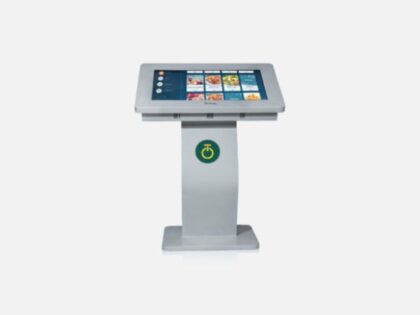
Onfinity Technologies Pvt. Ltd. offers digital signage kiosks in different configurations, including touch and non-touch options, portrait and landscape layouts, and Android or Windows-based configurations depending on the selected model.
These options can support different display and information requirements across business and public environments. For a hospital project, the appropriate configuration depends on the intended use, software requirements and any necessary integrations.
You can explore the available digital signage kiosk solutions or read our guide to self-service kiosk pricing in India to understand the factors that influence configuration and cost.
Hospitals planning an interactive check-in or queue management system should confirm their application and integration requirements before selecting the hardware.
Final Thoughts
Self-service kiosks can help hospitals make patient check-in, wayfinding and routine information access more organised. When the right hardware is combined with suitable software, secure integration and clear instructions, kiosks can support reception teams and improve how visitors navigate hospital services.
The best approach is to start with the actual needs of patients and staff, then choose a configuration that fits the hospital’s workflow. Digital technology should make the experience simpler, while keeping accessibility, privacy and human assistance at the centre of patient care.
Frequently Asked Questions
A hospital self-service kiosk is a digital terminal that allows patients or visitors to access information or complete selected tasks. Depending on its software, it may support check-in, directions, appointment information or other services.
It may help streamline routine tasks and improve the flow of information. The actual effect on waiting times depends on patient volume, staff workflows, software integration and how the kiosk is used.
Yes, when connected to compatible queue management or appointment software. The hardware alone does not provide a complete queue management system.
Hospitals should assess usability, accessibility, privacy, security, software compatibility, integration requirements, installation space and ongoing support.
Not necessarily. Some patients may find self-service convenient, while others may need staff assistance. Hospitals should retain accessible alternatives and personal support.