
Choosing an interactive flat panel display is not only about selecting a screen size or looking for the lowest price. Buyers also need to understand the features that affect everyday use, connectivity, interaction, and long-term practicality.
For schools, offices, training centres, and other organisations, the right interactive flat panel should match the room, users, content, and way the display will be used.
This guide explains the key interactive flat panel display features buyers should check before comparing models or requesting quotations.
For a broader overview of the buying process, see our interactive flat panel display buying guide.
What Is an Interactive Flat Panel Display?
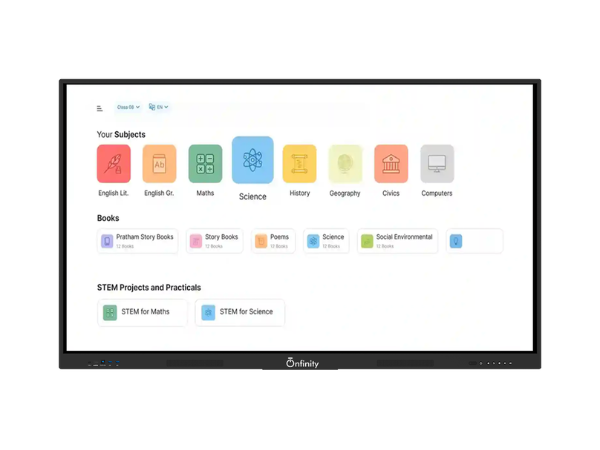
An interactive flat panel display is a large touchscreen display designed for teaching, presentations, collaboration, and digital content.
Unlike a standard television or monitor, an interactive panel allows users to interact directly with content on the screen. Depending on the model, it can support functions such as touch interaction, digital annotation, screen sharing, built-in software, and connected devices.
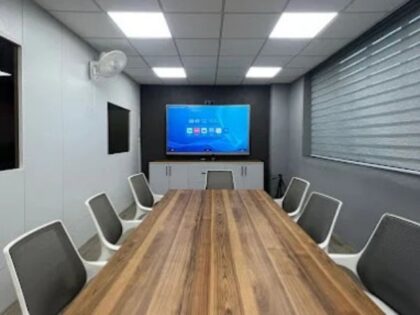
Onfinity Technologies Pvt. Ltd. currently offers interactive flat panel displays for applications including smart classrooms, training rooms, conference halls, boardrooms, and huddle rooms. Its current product information highlights 4K displays, multi-touch interaction, built-in tools, and screen sharing.
What Features Should You Check in an Interactive Flat Panel?
1. Display Resolution
Resolution determines how much visual detail a display can show.
For classrooms and meeting rooms, higher resolution can make text, diagrams, presentations, charts, images, and videos easier to view.
Onfinity Technologies’ current classroom guidance confirms True 4K UHD resolution across its referenced 65-inch, 75-inch, and 86-inch models.
However, resolution should not be considered by itself. Screen size and viewing distance also affect how clearly people can see content.
2. Touch Technology
Touch is one of the most important features of an interactive flat panel.
When comparing models, check:
- Touch technology
- Number of simultaneous touch points
- Touch accuracy
- Writing response
- Stylus support, where available
- Whether multiple users can interact with the screen
Onfinity Technologies’ current product information includes infrared touch technology and multi-touch options. Its current classroom guide also identifies Advanced 40-point IR multi-touch on specific 65-inch, 75-inch, and 86-inch models, while other models may have different touch configurations.
This is why buyers should always check the specification of the exact model rather than assuming that every panel has the same touch capability.
3. Screen Sharing and Connectivity
An interactive display often needs to work with laptops, computers and other devices.
Before purchasing, check the available connectivity options and how content can be shared with the panel.
Screen sharing can be particularly useful in classrooms and meeting rooms. A teacher may want to display material from another device, while a presenter may need to bring content from a laptop onto the main screen.
Onfinity Technologies’ current IFPD page specifically highlights easy screen sharing and device integration.
The exact ports and connectivity options should still be checked against the specific model.
4. Operating System and Computing
The internal computing setup can affect how an interactive flat panel is used.
Some panels can operate with built-in computing capabilities, while others may support an optional PC or external computer.
Onfinity Technologies’ current IFPD information lists an integrated Android player and optional PC configurations on the referenced product range.
Buyers should ask:
- What operating system is included?
- Is an integrated player available?
- Is an optional PC supported?
- What software is included?
- Can external computers be connected?
- Are the required applications supported?
The exact configuration should be confirmed for the model being purchased.
5. Built-In Tools and Software
Built-in tools can make an interactive display more practical for everyday teaching and collaboration.
Depending on the model, buyers may look for functions such as digital whiteboarding, annotation, content sharing, and other built-in tools.
Onfinity Technologies’ current product page states that its IFPDs include built-in tools and built-in software for classroom use.
The important point is to understand what is actually included rather than assuming that every interactive panel provides the same software environment.
For a closer look at how interactive displays can support teaching activities, explore our guide to smart board for classroom learning.
6. Brightness and Viewing Experience
A display needs to remain comfortable to view under the lighting conditions of the room.
Consider:
- Natural daylight
- Artificial lighting
- Viewing distance
- Screen reflections
- Seating arrangement
- Content type
Onfinity Technologies’ current IFPD information lists automatic brightness adjustment on the referenced product configuration.
For any purchase, it is still useful to evaluate the display in the environment where it will actually be installed.
7. Physical Design and Maintenance
An interactive panel used every day in a classroom or meeting room needs to be practical to maintain.
Features related to the physical design can therefore matter.
Onfinity Technologies’ current product information lists an integrated dust-proof design on the referenced configuration and a front-loading USB arrangement for easier access.
For schools and organisations, buyers should also consider installation access, cable management, mounting requirements, and how easily users can access frequently used connections.
8. Screen Size
Screen size affects visibility and should match the room.
A 65-inch panel may suit one environment, while a larger 75-inch, 86-inch, or 98-inch display may be more appropriate for another space.
The decision should consider:
- Room dimensions
- Viewing distance
- Number of viewers
- Seating arrangement
- Type of content
- Available wall space
Onfinity Technologies’ current range includes multiple screen-size options, so buyers should compare the specific model and size rather than treating all panels as identical.
For a more detailed approach to screen selection, see our interactive flat panel display size guide
Which Interactive Flat Panel Features Matter Most?
Not every buyer needs every available feature.
For a school, touch response, display clarity, classroom software, screen sharing, connectivity, and ease of operation may be important.
For an office or meeting room, connectivity, screen sharing, display quality, collaboration features, and compatibility with the existing setup may receive more attention.
The right feature combination depends on the actual use case.
A useful approach is to divide requirements into three groups:
| Requirement | What to Check |
|---|---|
| Essential | Features users need every day |
| Useful | Features that improve convenience |
| Optional | Features that may not be necessary for the intended use |
This prevents buyers from paying for specifications that do not provide practical value.
You can also review Onfinity Technologies Pvt. Ltd.’s interactive flat panel displays to compare the available range and configurations.
How to Compare Interactive Flat Panel Specifications
Do not compare products using only screen size or resolution.
Create a specification checklist covering:
- Screen size
- Resolution
- Touch technology
- Touch points
- Operating system
- Computing options
- Connectivity
- Screen sharing
- Built-in tools
- Audio
- Installation requirements
- Maintenance considerations
- Warranty and support
Most importantly, compare the same specifications across different models.
If one quotation lists a feature while another does not mention it, ask the supplier whether the feature is unavailable or simply omitted from the quotation.
Common Mistakes Buyers Should Avoid
Choosing Only by Screen Size
A larger display is not automatically the right display. Room dimensions and viewing distance matter.
Comparing Only the Price
Two panels with similar screen sizes can have different specifications and configurations. Compare the complete quotation.
Assuming All Models Have the Same Features
Product ranges can include different configurations. Always check the exact model specification.
Ignoring Existing Devices
Think about the laptops, computers, networks, cameras, and other equipment that need to work with the display.
Buying Features That Will Not Be Used
A long specification list does not automatically mean a better fit. Focus on the features that support the actual use case.
What Should You Ask Before Buying an Interactive Flat Panel?
Before finalising a purchase, ask the supplier for the exact model specification and confirm:
- What screen sizes are available?
- What resolution does the model provide?
- What touch technology does it use?
- How many simultaneous touch points are supported?
- Which operating system or computing options are included?
- What connectivity options are available?
- How does screen sharing work?
- Which built-in tools and software are included?
- What installation requirements should be considered?
- What warranty and support terms apply?
Getting these details in writing makes it easier to compare different products accurately.
For schools that need more classroom-specific guidance, see our how to choose the right interactive flat panel for a classroom guide before finalising a display.
Final Thoughts
The most useful interactive flat panel display is not necessarily the one with the longest specification sheet.
Buyers should focus on the features that matter for their room, users, content, and daily workflow. Display resolution, touch technology, connectivity, computing options, screen sharing, built-in tools, screen size, and maintenance requirements are all worth checking before making a decision.
Onfinity Technologies Pvt. Ltd. currently provides interactive flat panel displays for education and professional environments, with different models and configurations available across its range. Buyers should confirm the specifications of the exact model before placing an order.
The goal is simple: choose an interactive display that fits the environment and provides the features users will actually rely on.
Frequently Asked Questions
The main features to compare include display resolution, touch technology, touch points, screen size, connectivity, operating system, computing options, screen sharing, built-in tools, and installation requirements.
4K resolution can provide detailed images and clearer text, particularly when displaying presentations, diagrams, charts, and other detailed content. However, resolution should be considered together with screen size and viewing distance.
There is no single number that suits every use case. The required touch capability depends on how many people need to interact with the display at the same time and how the panel will be used.
No. Features can vary between models and product series. Buyers should always check the specifications of the exact model they are considering.
Schools should consider classroom size, viewing distance, resolution, touch response, screen size, connectivity, software requirements, screen sharing, installation, maintenance, and long-term support.
Yes. Interactive flat panels can be used for presentations, meetings, collaboration, training sessions, and other professional applications, depending on the configuration.
No. Price is only one part of the buying decision. Compare the complete specifications, included features, installation requirements, warranty, and support before making a decision.